

Understanding RADIUS Dead Criteria and Deadtime on IOS XE
Introduction
During the design of an ISE cluster architecture, one of the most important aspects is defining how the switch should respond when the cluster nodes dedicated to authentication, known as Policy Service Nodes (PSNs), become unreachable. This can result from a backbone connectivity issue, a server fault, or a VM-level problem. Authentication requests may stop receiving responses, endpoints may remain stuck in limbo, and, depending on the switch configuration, a single unresponsive server can become a bottleneck for every new session on the port. The switch must therefore be able to identify when a specific server is no longer reachable and mark it as DEAD in Cisco terminology.
This post explains the parameters that come into play when one or more RADIUS servers are classified as DEAD.
Background AAA Configuration
Before examining the RADIUS server detection mechanism in detail, it is useful to briefly review how an AAA server is defined on the IOS XE platform. As with any AAA configuration, the service must first be enabled globally. The command used for this is aaa new-model.
RADIUS Server Object
Once the feature is enabled, an individual server object can be created using the command radius server <RADIUS-Server-Name>. The following options are available for configuration at the single-server level.
1Switch(config)#radius server TEST
2Switch(config-radius-server)#?
3RADIUS server sub-mode commands:
4  address                    Specify the radius server address
5  automate-tester            Configure server automated testing.
6  backoff                    Retry backoff pattern(Default is retransmits with
7                             constant delay)
8  dscp                       Set Radius dscp marking value
9  dtls                       Configure DTLS parameters
10  exit                       Exit from RADIUS server configuration mode
11  ignore-acct-authenticator  Ignore accounting authenticator errors (warn only)
12  key                        Per-server encryption key
13  key-wrap                   per-server keywrap configuration
14  no                         Negate a command or set its defaults
15  non-standard               Attributes to be parsed that violate RADIUS
16                             standard
17  pac                        Protected Access Credential key
18  retransmit                 Number of retries to active server (overrides
19                             default)
20  timeout                    Time to wait (in seconds) for this radius server
21                             to reply (overrides default)
22  tls                        Configure TLS parameters
In addition to the fundamental parameters such as the server IP address, the UDP destination ports to be used and the pre-shared key used to encrypt the user password in RADIUS packets, three other parameters are especially important: backoff, retransmit, and timeout. These parameters can be configured in multiple contexts, as shown in the following sections. They define how retransmissions are handled in the event of a timeout for a specific request. The details are covered later; for now, they are only introduced at a high level.
RADIUS Server Without Key Configuration
For anyone consulting the official Cisco documentation for AAA service configuration, the following guide may appear to indicate that the key is optional. If the key is not configured, the output shown below is produced after enabling debugging with the debug radius command.
1*Sep  7 19:03:12.141: RADIUS/ENCODE(00000000):Orig. component type = Invalid
2*Sep  7 19:03:12.141: RADIUS/ENCODE: Skip encoding 0 length AAA attribute formatted-clid
3*Sep  7 19:03:12.141: RADIUS(00000000): Config NAS IP: 10.105.60.246
4*Sep  7 19:03:12.141: vrfid: [65535]  ipv6 tableid : [0]
5*Sep  7 19:03:12.141: idb is NULL
6*Sep  7 19:03:12.141: RADIUS(00000000): Config NAS IPv6: ::
7*Sep  7 19:03:12.141: RADIUS(00000000): sending
8*Sep  7 19:03:12.141: RADIUS/DECODE(00000000): There is no General DB. Want server details may not be specified
9*Sep  7 19:03:12.141: RADIUS/ENCODE(00000000):Orig. component type = Invalid
10*Sep  7 19:03:12.141: RADIUS/ENCODE: Skip encoding 0 length AAA attribute formatted-clid
11*Sep  7 19:03:12.141: RADIUS(00000000): Config NAS IP: 10.105.60.246
12*Sep  7 19:03:12.141: vrfid: [65535]  ipv6 tableid : [0]
13*Sep  7 19:03:12.141: idb is NULL
14*Sep  7 19:03:12.142: RADIUS(00000000): Config NAS IPv6: ::
15*Sep  7 19:03:12.142: RADIUS(00000000): sending
16*Sep  7 19:03:12.142: RADIUS: No secret to encode request (rctx:0x3F4F0A88)
17*Sep  7 19:03:12.142: RADIUS: Unable to encrypt (rctx:0x3F4F0A88)
18*Sep  7 19:03:12.142: RADIUS: No secret to encode request (rctx:0x3F4F0A88)
19*Sep  7 19:03:12.142: RADIUS: Unable to encrypt (rctx:0x3F4F0A88)
20*Sep  7 19:03:12.142: RADIUS: No secret to encode request (rctx:0x3F4F0A88)
21*Sep  7 19:03:12.142: RADIUS: Unable to encrypt (rctx:0x3F4F0A88)
22*Sep  7 19:03:12.142: RADIUS: No secret to encode request (rctx:0x3F4F0A88)
23*Sep  7 19:03:12.142: RADIUS: Unable to encrypt (rctx:0x3F4F0A88)
24*Sep  7 19:03:12.142: RADIUS: No secret to encode request (rctx:0x3F4F0A88)
25*Sep  7 19:03:12.142: RADIUS: Unable to encrypt (rctx:0x3F4F0A88)
26*Sep  7 19:03:12.142: RADIUS/DECODE: No response from radius-server; parse response; FAIL
27*Sep  7 19:03:12.142: RADIUS/DECODE: Case error(no response/ bad packet/ op decode);parse response; FAIL
28*Sep  7 19:03:12.143: RADIUS: No secret to encode request/response (rctx:0x3F2866A8)
29*Sep  7 19:03:12.143: RADIUS: Unable to encrypt (rctx:0x3F2866A8)
30*Sep  7 19:03:12.143: RADIUS: No secret to encode request/response (rctx:0x3F2866A8)
31*Sep  7 19:03:12.143: RADIUS: Unable to encrypt (rctx:0x3F2866A8)
32*Sep  7 19:03:12.143: RADIUS: No secret to encode request/response (rctx:0x3F2866A8)
33*Sep  7 19:03:12.143: RADIUS: Unable to encrypt (rctx:0x3F2866A8)
34*Sep  7 19:03:12.143: RADIUS: No secret to encode request/response (rctx:0x3F2866A8)
35*Sep  7 19:03:12.143: RADIUS: Unable to encrypt (rctx:0x3F2866A8)
36*Sep  7 19:03:12.143: RADIUS: No secret to encode request/response (rctx:0x3F2866A8)
37*Sep  7 19:03:12.143: RADIUS: Unable to encrypt (rctx:0x3F2866A8)
38*Sep  7 19:03:12.143: RADIUS/DECODE: No response from radius-server; parse response; FAIL
39*Sep  7 19:03:12.143: RADIUS/DECODE: Case error(no response/ bad packet/ op decode);parse response; FAIL
40*Sep  7 19:03:12.144: %RADIUS-4-RADIUS_DEAD: RADIUS server 192.168.1.1:1812,1813 is not responding.
41*Sep  7 19:03:12.173: %RADIUS_AUDIT_MESSAGE-6-RADIUS_DEAD: Switch 1 R0/0: sessmgrd: RADIUS server 192.168.1.1:1812,1813 is not responding.
As shown in the output, the Network Access Device (NAD) does not have a pre-shared key configured, so it is unable to encrypt the user password (in this case, a test user) and therefore cannot send a valid RADIUS Access-Request to the configured fictitious IP address (192.168.1.1).
RADIUS Server Group
Once one or more RADIUS server objects have been created, they can be grouped into one or more RADIUS server groups. A RADIUS server group is defined using the command aaa group server radius <RADIUS-Server-Group-Name>. In addition to inserting the server objects in an ordered list, the RADIUS server group can also define parameters such as those previously discussed: backoff, retransmit, and timeout. Their configuration-level priority is described in the Dead Server Detection section. The following is an example of a RADIUS server group configuration.
1Switch#show running-config aaa | section group
2[OUTPUT OMITTED]
3aaa group server radius RADIUS-ISE
4 server name IT-PSN-01-EVENG
5 server name IT-PSN-02-EVENG
At this point, it is important to clarify one detail that can be confusing when reviewing the RADIUS server group configuration. As soon as at least one RADIUS server object is defined, IOS XE automatically creates a RADIUS server group named radius. The output below, obtained with the command show radius server-group all, shows that only the default group is present because no custom group has been created yet.
1Switch#show radius server-group all
2Server group radius
3    Sharecount = 1  sg_unconfigured = FALSE
4    Type = standard  Memlocks = 1
5    Server(10.106.46.51:1812,1813,IT-PSN-01-EVENG) Transactions:
6    Authen: 0   Author: 0       Acct: 0
7    Server_auto_test_enabled: TRUE
8     Keywrap enabled: FALSE
9    Server(UNKNOWN:65535,65535,TEST) Transactions:
10    Authen: 0   Author: 0       Acct: 0
11    Server_auto_test_enabled: FALSE
12     Keywrap enabled: FALSE
All configured RADIUS server objects become part of this default group. This group can then be used in the authentication method list configuration presented next.
More than one server can be added to a RADIUS server group. But when several servers are available, which one does the switch contact first, and what must happen before it moves to the next one? By default, the servers are used in sequence, starting with the first one, meaning the server that was inserted first in the RADIUS server group. Suppose a RADIUS server group contains two RADIUS servers named RAD-1 and RAD-2. To use RAD-2, RAD-1 must first be marked as unavailable, or as DEAD in Cisco terminology.
It is also worth noting that two additional modes are available: load-balanced and round-robin, in addition to the default sequential next mode.
1Switch(config-sg-radius)#pick-method ?
2  load-balanced  Initial host is picked load-balanced.
3  next           Step through the list sequentially, always starting at the
4                 top.
5  round-robin    Initial host is picked round-robin-fashion.
Although these modes are available, they are generally discouraged and rarely used. If one of the alternative modes is attempted, the following warning is shown to the user.
1*Sep 7 19:44:50.502: %PARSER-5-HIDDEN: Warning!!! ' pick-method load-balanced ' is a hidden command. Use of this command is not recommended/supported and will be removed in future.As with RADIUS server objects, multiple RADIUS server groups can also be created, provided they have different names; otherwise, they would overwrite the existing RADIUS server group definition.
Authentication Method List
At this point, all the fundamental objects needed to enable authentication have been created. The final step is to define the authentication method list, an ordered set of methods used to authenticate an endpoint or user accessing the network rather than an administrator accessing the switch. The available authentication methods are listed below. The software tries them in the order in which they are listed, moving to the next method only if the previous one does not respond. If a method explicitly rejects the user, the process stops. This process continues until a successful response is received or all configured methods have been exhausted.
The following authentication methods can be included in the list:
- cache (rarely used)
- group (most commonly used)
- local (used for TACACS method lists, but not typically for RADIUS; it uses local username authentication)
- radius (used less often and considers all configured RADIUS server objects)
If the radius parameter is used inside the authentication method list, the following message is displayed automatically:
1*Sep 7 19:45:13.333: %PARSER-5-HIDDEN: Warning!!! ' aaa authentication dot1x default group RADIUS-ISE radius ' is a hidden command. Use of this command is not recommended/supported and will be removed in future.The purpose of this warning is to force the creation of custom objects rather than using the default ones.
The following is a typical authentication method list using RADIUS servers. The method list can use a single group, as just described.
1Switch#show running-config aaa | include default group
2aaa authentication dot1x default group RADIUS-ISE
For RADIUS authentication, the reference configuration for authentication method lists normally includes only one or more RADIUS groups, excluding other options. For example, method lists used to authenticate administrators attempting to access a device commonly place the local entry at the end of the list. In this way, regardless of the availability of higher-priority methods, access to the device remains possible through one or more locally defined users.
One may wonder whether it is possible to configure multiple authentication method lists using the default option. The answer is no. This is analogous to creating two method lists with the same name; they cannot coexist.
Now that the selection principles behind these method lists have been reviewed, the next step is to examine in detail the mechanism used to identify a generic AAA server that is no longer reachable.
Dead Server Feature
The fundamental components needed to address the main topic of this post have now been introduced: how a RADIUS server is identified and marked as DEAD.
At a high level, an AAA server, and in this case a PSN node in an ISE deployment, is classified as DEAD when the switch can no longer receive a valid response to the RADIUS requests it sends. Conversely, a server that responds correctly to the NAD's RADIUS messages remains UP.
Dead Server Detection
How does IOS XE determine when a RADIUS server is DEAD? The AAA Dead Server Detection feature defines the criteria used to determine when a RADIUS server is marked as DEAD. Two conditions must be satisfied, and both are evaluated per server. In other words, if multiple server objects are defined within the same RADIUS server group, each server is evaluated independently. An exception to this rule, observed when the retransmit limit is reached first, is shown later in this section.
- A minimum time interval, expressed in seconds, must elapse since the NAD sent the first retransmission after an unanswered RADIUS request
- A minimum number of consecutive unsuccessful attempts for the same RADIUS request must occur, including the first transmission
If no valid packet has been received since the device was last booted and a timeout occurs, the time-based condition is considered satisfied by default.
The command used to define the numeric values for conditions #1 and #2 is radius-server dead-criteria time <timeout-no-response> tries <tries-number>, where:
- timeout-no-response is the timer that starts when the NAD sends the first retransmission, after the original request has timed out
- tries-number is the number of attempts that the NAD must make to send the RADIUS request
Beyond the time and tries parameters in the command above, the previously introduced timeout and retransmit settings are also essential to understanding the detection process. The timeout setting (default value: 5 seconds) defines the interval between retransmissions, while retransmit (default value: 3 retransmissions) defines how many times the NAD re-sends the same packet without receiving a response. These parameters, together with the backoff configuration, can generally be set at three levels: the RADIUS server object, the RADIUS server group, and the global configuration. The priority order is the RADIUS server object, the RADIUS server group, and finally the global configuration. When the same parameter is configured at multiple levels, the most specific configuration takes precedence.
But what happens when these values conflict? The following scenario examines a configuration with radius-server dead-criteria time 34 tries 9 and radius-server retransmit 2. The tries 9 setting defines the dead-detection threshold, while retransmit 2 limits the request to two retransmissions after the initial transmission. The transaction can therefore end after three unanswered attempts, before the configured tries threshold is reached.
1*Sep  7 20:06:30.473: RADIUS/ENCODE(00000000):Orig. component type = Invalid
2*Sep  7 20:06:30.473: RADIUS/ENCODE: Skip encoding 0 length AAA attribute formatted-clid
3*Sep  7 20:06:30.473: RADIUS(00000000): Config NAS IP: 10.105.60.246
4*Sep  7 20:06:30.473: vrfid: [65535]  ipv6 tableid : [0]
5*Sep  7 20:06:30.473: idb is NULL
6*Sep  7 20:06:30.473: RADIUS(00000000): Config NAS IPv6: ::
7*Sep  7 20:06:30.473: RADIUS(00000000): sending
8*Sep  7 20:06:30.473: RADIUS/DECODE(00000000): There is no General DB. Want server details may not be specified
9*Sep  7 20:06:30.474: RADIUS: nas-port-id(87) is not found in the request
10*Sep  7 20:06:30.474: AAA/SG/TRANSAC: ACCESS raised to 1
11Switch#
12*Sep  7 20:06:30.474: RADIUS(00000000): Send Access-Request to 10.106.46.51:1812 id 1645/92, len 64
13RADIUS:  authenticator BF 52 30 0D 9C B6 C5 2A - 0C E6 0B 86 6A A9 44 AE
14*Sep  7 20:06:30.474: RADIUS:  User-Password       [2]   18  *
15*Sep  7 20:06:30.474: RADIUS:  User-Name           [1]   14  "TEST-PROBE-1"
16*Sep  7 20:06:30.474: RADIUS:  Service-Type        [6]   6   Login                     [1]
17*Sep  7 20:06:30.474: RADIUS:  NAS-IP-Address      [4]   6   10.105.60.246
18*Sep  7 20:06:30.474: RADIUS(00000000): Sending a IPv4 Radius Packet
19*Sep  7 20:06:30.474: RADIUS(00000000): Started 6 sec timeout
20Switch#
21*Sep  7 20:06:36.520: RADIUS(00000000): Request timed out!
22*Sep  7 20:06:36.520: AAA/SG/TRANSAC: Computed Retransmit Tries: 9, Current Tries: 1, Current Max Tries: 9,
23AAA/SG/TRANSAC:Server IP address:10.106.46.51,authentication port:1812,accounting port1813
24*Sep  7 20:06:36.520: AAA/SG/TRANSAC: Computed Dead Detect Interval: 34 s, Elapsed Time: 0 s, Current Max Interval: 34 s
25*Sep  7 20:06:36.520: AAA/SG/TRANSAC: Estimated Outstanding Transactions: 1, Current Max Transactions: 1
26*Sep  7 20:06:36.521: RADIUS: Retransmit to (10.106.46.51:1812,1813) for id 1645/92
27*Sep  7 20:06:36.521: RADIUS(00000000): Started 6 sec timeout
28Switch#
29*Sep  7 20:06:42.568: RADIUS(00000000): Request timed out!
30*Sep  7 20:06:42.568: AAA/SG/TRANSAC: Computed Retransmit Tries: 9, Current Tries: 2, Current Max Tries: 9,
31AAA/SG/TRANSAC:Server IP address:10.106.46.51,authentication port:1812,accounting port1813
32*Sep  7 20:06:42.568: AAA/SG/TRANSAC: Computed Dead Detect Interval: 34 s, Elapsed Time: 6 s, Current Max Interval: 34 s
33*Sep  7 20:06:42.568: AAA/SG/TRANSAC: Estimated Outstanding Transactions: 1, Current Max Transactions: 1
34*Sep  7 20:06:42.568: RADIUS: Retransmit to (10.106.46.51:1812,1813) for id 1645/92
35*Sep  7 20:06:42.568: RADIUS(00000000): Started 6 sec timeout
36Switch#
37*Sep  7 20:06:48.621: RADIUS(00000000): Request timed out!
38*Sep  7 20:06:48.621: AAA/SG/TRANSAC: Computed Retransmit Tries: 9, Current Tries: 3, Current Max Tries: 9,
39AAA/SG/TRANSAC:Server IP address:10.106.46.51,authentication port:1812,accounting port1813
40*Sep  7 20:06:48.621: AAA/SG/TRANSAC: Computed Dead Detect Interval: 34 s, Elapsed Time: 12 s, Current Max Interval: 34 s
41*Sep  7 20:06:48.621: AAA/SG/TRANSAC: Estimated Outstanding Transactions: 1, Current Max Transactions: 1
42*Sep  7 20:06:48.621: RADIUS: No response from (10.106.46.51:1812,1813) for id 1645/92
43*Sep  7 20:06:48.621: AAA/SG/TRANSAC: ACCESS lowered to 0
44*Sep  7 20:06:48.621: RADIUS/DECODE: No response from radius-server; parse response; FAIL
45*Sep  7 20:06:48.621: RADIUS/DECODE: Case error(no response/ bad packet/ op decode);parse response; FAIL
46*Sep  7 20:06:48.622: AAA/SG/TRANSAC: Initializing deadtime timer for server (10.106.46.51:1812,1813) for 240 secs.
47*Sep  7 20:06:48.622: %RADIUS-4-RADIUS_DEAD: RADIUS server 10.106.46.51:1812,1813 is not responding.
As shown in the output, the transaction ends after three unanswered attempts: the initial transmission and two retransmissions. The configured tries 9 threshold is therefore not reached, and neither dead-detection condition is satisfied according to the counters shown in the log. Nevertheless, the failed transaction causes the server to be marked as DEAD, and the deadtime timer configured with radius-server deadtime 4 is started. In this observed scenario, the retransmit setting limits the transaction before the tries threshold is reached; it does not prevent the server from being classified as DEAD after the request fails.
1*Sep  7 20:07:53.516: RADIUS(00000000): Request timed out!
2*Sep  7 20:07:53.517: AAA/SG/TRANSAC: Computed Retransmit Tries: 4, Current Tries: 4, Current Max Tries: 4,
3AAA/SG/TRANSAC:Server IP address:10.106.46.51,authentication port:1812,accounting port1813
4*Sep  7 20:07:53.517: AAA/SG/TRANSAC: Computed Dead Detect Interval: 34 s, Elapsed Time: 60 s, Current Max Interval: 34 s
5*Sep  7 20:07:53.517: AAA/SG/TRANSAC: Estimated Outstanding Transactions: 1, Current Max Transactions: 1
6*Sep  7 20:07:53.517: RADIUS: Retransmit to (10.106.46.51:1812,1813) for id 1645/19
7*Sep  7 20:07:53.517: RADIUS(00000000): Started 6 sec timeout
8Switch(config)#
9*Sep  7 20:07:59.565: RADIUS(00000000): Request timed out!
10*Sep  7 20:07:59.565: AAA/SG/TRANSAC: Computed Retransmit Tries: 4, Current Tries: 5, Current Max Tries: 4,
11AAA/SG/TRANSAC:Server IP address:10.106.46.51,authentication port:1812,accounting port1813
12*Sep  7 20:07:59.565: AAA/SG/TRANSAC: Computed Dead Detect Interval: 34 s, Elapsed Time: 66 s, Current Max Interval: 34 s
13*Sep  7 20:07:59.565: AAA/SG/TRANSAC: Estimated Outstanding Transactions: 1, Current Max Transactions: 1
14*Sep  7 20:07:59.565: RADIUS: Retransmit to (10.106.46.51:1812,1813) for id 1645/19
15*Sep  7 20:07:59.565: RADIUS(00000000): Started 12 sec timeout
16Switch(config)#
17*Sep  7 20:08:11.600: RADIUS(00000000): Request timed out!
18*Sep  7 20:08:11.600: AAA/SG/TRANSAC: Computed Retransmit Tries: 4, Current Tries: 6, Current Max Tries: 4,
19AAA/SG/TRANSAC:Server IP address:10.106.46.51,authentication port:1812,accounting port1813
20*Sep  7 20:08:11.601: AAA/SG/TRANSAC: Computed Dead Detect Interval: 34 s, Elapsed Time: 78 s, Current Max Interval: 34 s
21*Sep  7 20:08:11.601: AAA/SG/TRANSAC: Estimated Outstanding Transactions: 1, Current Max Transactions: 1
22*Sep  7 20:08:11.601: RADIUS: Retransmit to (10.106.46.51:1812,1813) for id 1645/19
23*Sep  7 20:08:11.601: RADIUS(00000000): Started 24 sec timeout
24Switch(config)#
25*Sep  7 20:08:35.618: RADIUS(00000000): Request timed out!
26*Sep  7 20:08:35.618: AAA/SG/TRANSAC: Computed Retransmit Tries: 4, Current Tries: 7, Current Max Tries: 4,
27AAA/SG/TRANSAC:Server IP address:10.106.46.51,authentication port:1812,accounting port1813
28*Sep  7 20:08:35.618: AAA/SG/TRANSAC: Computed Dead Detect Interval: 34 s, Elapsed Time: 102 s, Current Max Interval: 34 s
29*Sep  7 20:08:35.618: AAA/SG/TRANSAC: Estimated Outstanding Transactions: 1, Current Max Transactions: 1
30*Sep  7 20:08:35.618: RADIUS: Retransmit to (10.106.46.51:1812,1813) for id 1645/19
31*Sep  7 20:08:35.618: RADIUS(00000000): Started 48 sec timeout
32Switch(config)#
33*Sep  7 20:09:23.652: RADIUS(00000000): Request timed out!
34*Sep  7 20:09:23.652: AAA/SG/TRANSAC: Computed Retransmit Tries: 4, Current Tries: 8, Current Max Tries: 4,
35AAA/SG/TRANSAC:Server IP address:10.106.46.51,authentication port:1812,accounting port1813
36*Sep  7 20:09:23.652: AAA/SG/TRANSAC: Computed Dead Detect Interval: 34 s, Elapsed Time: 150 s, Current Max Interval: 34 s
37*Sep  7 20:09:23.652: AAA/SG/TRANSAC: Estimated Outstanding Transactions: 1, Current Max Transactions: 1
38*Sep  7 20:09:23.652: RADIUS: Retransmit to (10.106.46.51:1812,1813) for id 1645/19
39*Sep  7 20:09:23.653: RADIUS(00000000): Started 96 sec timeout
40[OUTPUT OMITTED]
Because several parameters contribute to dead-server detection, a dedicated command is useful for verifying the effective settings of a specific RADIUS server: show aaa dead-criteria radius server-name <RADIUS-server-name>.
1Switch#show aaa dead-criteria radius server-name IT-PSN-01-EVENG
2RADIUS Server Dead Criteria:
3=============================
4Server Details:
5    Address   : 10.106.46.51
6    Auth Port : 1812
7    Acct Port : 1813
8Server Group  : radius
9Dead Criteria Details:
10    Configured Retransmits   : 11
11    Configured Timeout       : 6
12    Estimated Outstanding Access Transactions: 0
13    Estimated Outstanding Accounting Transactions: 0
14    Dead Detect Time         : 37s
15    Computed Retransmit Tries: 4
16Statistics Gathered Since Last Successful Transaction
17=====================================================
18    Max Computed Outstanding Transactions: 2
19    Max Computed Dead Detect Time: 74s
20    Max Computed Retransmits : 8
Having examined the criteria that cause a RADIUS server to be marked as DEAD, the next step is to examine the second mechanism: the deadtime timer.
Deadtime Timer
After the server is detected and marked as DEAD, the second phase begins: the server is treated as unavailable and is not used for a limited period of time. This phase is configured with the command radius-server deadtime <RADIUS-server-dead-timer>. The parameter specifies the number of minutes during which the server is excluded from the authentication request rotation, except for requests generated by the automatic tester, which are initiated directly by the switch and operate according to either of the two modes described in the next section.
The default value for this parameter is 0, as confirmed by the following debug output when the command is not configured.
1*Sep 7 20:34:53.977: AAA/SG/TRANSAC: Initializing deadtime timer for server (10.106.46.51:1812,1813) for 0 secs.Dead Server Automatic Testing
A feature that is used almost constantly when preparing the configuration of one or more RADIUS server objects is the automatic testing of the RADIUS service, available through the automate-tester command. It allows the automatic testing of the RADIUS service for each configured RADIUS server object. Each object can have only one type of automatic testing, which can operate in two different modes:
- Automatic testing every X minutes using automate-tester username <test-username> idle-time <tester-timer>
- Automatic testing only when the server is marked DEAD using automate-tester username <test-username> probe-on
What is the main difference between the two modes? In the first case, automatic testing occurs independently of the server state. In the second mode, the RADIUS server is tested only after the deadtime timer has expired. The main disadvantage of this second mode is that even if the RADIUS server becomes available again, it is not used until the deadtime expires and a new request is sent to that server.
A reasonable question is whether a RADIUS response containing an Access-Accept is required for automatic testing to be considered successful. The answer is no: the necessary and sufficient condition for a RADIUS server to be marked as UP is that a response is received from the server, regardless of whether it is positive or negative. Within ISE, it is therefore possible to create a dedicated user with an associated policy, or even to leave it unconfigured.
Dead Server Example
The following example shows how the dead-server feature behaves in practice. This test examines the feature using automatic testing, whose configuration is shown below. For a real client or endpoint scenario, refer to the official Cisco troubleshooting guide. The implemented configuration is reviewed first.
1Switch#show running-config aaa
2!
3aaa authentication dot1x default group RADIUS-ISE
4aaa authorization network default group RADIUS-ISE
5aaa accounting dot1x default start-stop group RADIUS-ISE
6aaa accounting update newinfo periodic 2880
7!
8aaa server radius dynamic-author
9 client 10.106.46.51 server-key cisco
10!
11radius server IT-PSN-01-EVENG
12 address ipv4 10.106.46.51 auth-port 1812 acct-port 1813
13 automate-tester username TEST-PROBE-1 ignore-acct-port idle-time 1
14 key cisco
15!
16radius server IT-PSN-02-EVENG
17 address ipv4 10.106.46.51 auth-port 1645 acct-port 1646
18 automate-tester username TEST-PROBE-2 ignore-acct-port idle-time 15
19 key cisco
20!
21radius-server attribute 6 on-for-login-auth
22radius-server attribute 8 include-in-access-req
23radius-server attribute 25 access-request include
24radius-server attribute 31 mac format ietf upper-case
25radius-server attribute 31 send nas-port-detail mac-only
26radius-server dead-criteria time 37 tries 4
27radius-server retransmit 11
28radius-server timeout 6
29radius-server deadtime 4
30!
31aaa group server radius RADIUS-ISE
32 server name IT-PSN-01-EVENG
33 server name IT-PSN-02-EVENG
34!
35aaa new-model
36aaa session-id common
37!
38ip radius source-interface Vlan10
For demonstration purposes, two RADIUS servers were configured to verify failover from IT-PSN-01-EVENG to IT-PSN-02-EVENG, as introduced in the previous sections. Although both servers share the same IP address, they are treated as separate entities because they use different ports. If the IP address and ports were the same, the following message would appear.
1Switch(config-sg-radius)#radius server IT-PSN-02-EVENG
2Switch(config-radius-server)#address ipv4 10.106.46.51 auth-port 1812 acct-port 1813
3%Server already exists with same address port combination.
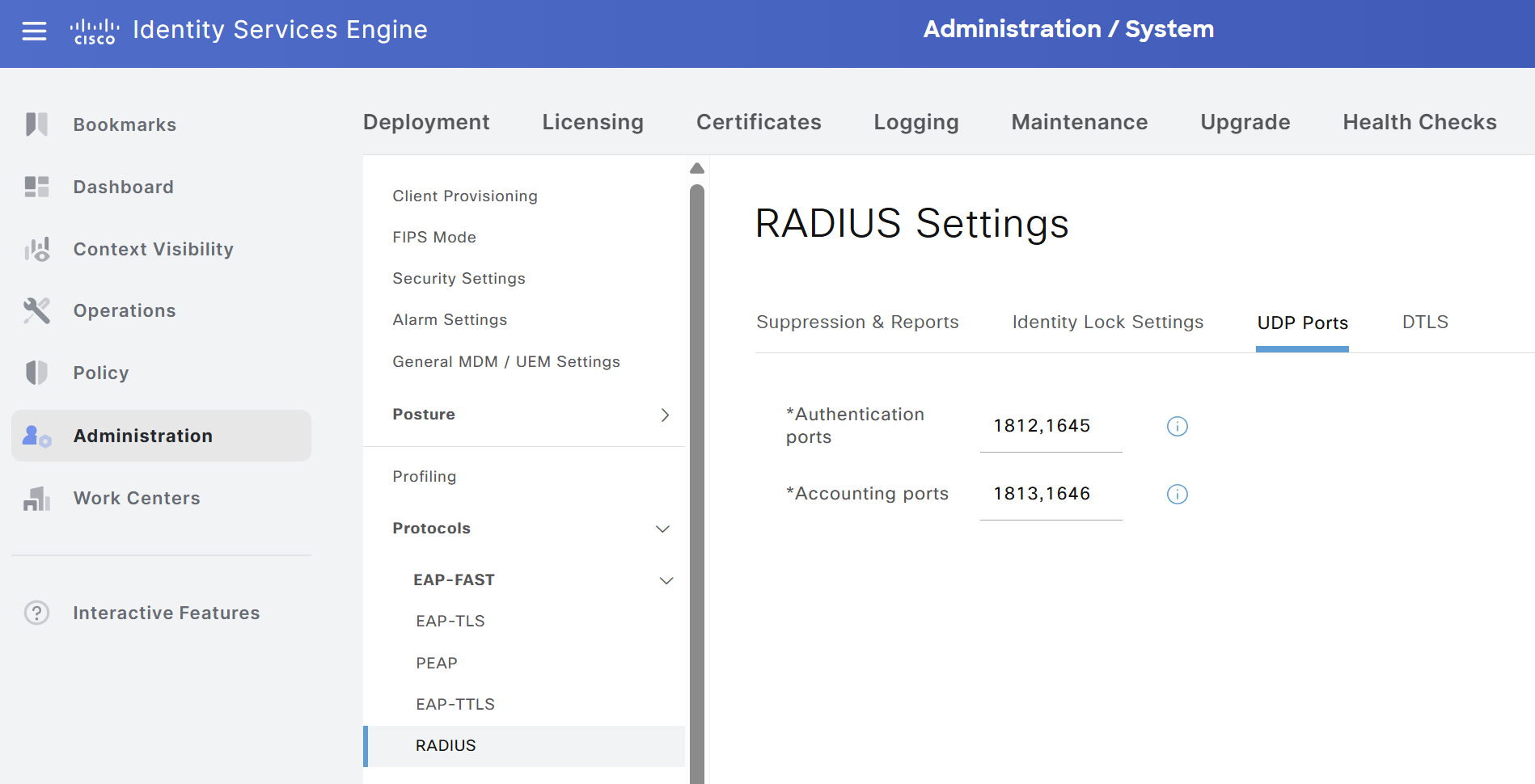
To use different ports, ISE must be configured accordingly. By default, ISE provides a predefined pair of ports for each service: authentication and accounting, as shown in the following image.
Before analyzing the behavior, it is necessary to enable the debug commands that allow all information related to counters and timers to be observed. For this purpose, the commands debug radius and debug aaa dead-criteria transaction were used.
The following output also confirms that automatic testing is active for both RADIUS servers, as shown by the values in the User-Name field.
1Switch(config-sg-radius)#
2*Sep  7 21:00:02.920: RADIUS/ENCODE(00000000):Orig. component type = Invalid
3*Sep  7 21:00:02.920: RADIUS/ENCODE: Skip encoding 0 length AAA attribute formatted-clid
4*Sep  7 21:00:02.920: RADIUS(00000000): Config NAS IP: 10.105.60.246
5*Sep  7 21:00:02.920: vrfid: [65535]  ipv6 tableid : [0]
6*Sep  7 21:00:02.920: idb is NULL
7*Sep  7 21:00:02.921: RADIUS(00000000): Config NAS IPv6: ::
8*Sep  7 21:00:02.921: RADIUS(00000000): sending
9*Sep  7 21:00:02.921: RADIUS/DECODE(00000000): There is no General DB. Want server details may not be specified
10*Sep  7 21:00:02.921: RADIUS: nas-port-id(87) is not found in the request
11*Sep  7 21:00:02.921: AAA/SG/TRANSAC: ACCESS raised to 1
12*Sep  7 21:00:02.921: RADIUS(00000000): Send Access-Request to 10.106.46.51:1812 id 1645/179, len 64
13RADIUS:  authenticator BE 48 46 2C BA 20 A9 F6 - 2D 6E A3 8F 42 96 FF 1D
14*Sep  7 21:00:02.921: RADIUS:  User-Password       [2]   18  *
15*Sep  7 21:00:02.921: RADIUS:  User-Name           [1]   14  "TEST-PROBE-1"
16*Sep  7 21:00:02.921: RADIUS:  Service-Type        [6]   6   Login                     [1]
17*Sep  7 21:00:02.921: RADIUS:  NAS-IP-Address      [4]   6   10.105.60.246
18*Sep  7 21:00:02.921: RADIUS(00000000): Sending a IPv4 Radius Packet
19*Sep  7 21:00:02.922: RADIUS(00000000): Started 6 sec timeout
20Switch(config-sg-radius)#
21*Sep  7 21:00:02.939: RADIUS: Received from id 1645/179 10.106.46.51:1812, Access-Reject, len 20
22RADIUS:  authenticator 96 34 14 A7 77 2F 81 7B - 58 AB A6 BC 28 CB B5 1D
23*Sep  7 21:00:02.939: AAA/SG/TRANSAC: ACCESS lowered to 0
24*Sep  7 21:00:02.939: RADIUS/DECODE(00000000): There is no General DB. Reply server details may not be recorded
25*Sep  7 21:00:02.939: RADIUS(00000000): Received from id 1645/179
26Switch(config-sg-radius)#
27*Sep  7 21:00:22.264: RADIUS/ENCODE(00000000):Orig. component type = Invalid
28*Sep  7 21:00:22.264: RADIUS/ENCODE: Skip encoding 0 length AAA attribute formatted-clid
29*Sep  7 21:00:22.265: RADIUS(00000000): Config NAS IP: 10.105.60.246
30*Sep  7 21:00:22.265: vrfid: [65535]  ipv6 tableid : [0]
31*Sep  7 21:00:22.265: idb is NULL
32*Sep  7 21:00:22.265: RADIUS(00000000): Config NAS IPv6: ::
33*Sep  7 21:00:22.265: RADIUS(00000000): sending
34*Sep  7 21:00:22.265: RADIUS/DECODE(00000000): There is no General DB. Want server details may not be specified
35*Sep  7 21:00:22.265: RADIUS: nas-port-id(87) is not found in the request
36*Sep  7 21:00:22.265: AAA/SG/TRANSAC: ACCESS raised to 1
37*Sep  7 21:00:22.265: RADIUS(00000000): Send Access-Request to 10.106.46.51:1645 id 1645/180, len 64
38RADIUS:  authenticator 66 74 BD 3B 63 D6 CF 35 - 9F 1B E9 3F 7F 72 94 76
39*Sep  7 21:00:22.265: RADIUS:  User-Password       [2]   18  *
40*Sep  7 21:00:22.265: RADIUS:  User-Name           [1]   14  "TEST-PROBE-2"
41*Sep  7 21:00:22.266: RADIUS:  Service-Type        [6]   6   Login                     [1]
42*Sep  7 21:00:22.266: RADIUS:  NAS-IP-Address      [4]   6   10.105.60.246
43*Sep  7 21:00:22.266: RADIUS(00000000): Sending a IPv4 Radius Packet
44*Sep  7 21:00:22.266: RADIUS(00000000): Started 6 sec timeout
45Switch(config-sg-radius)#
46*Sep  7 21:00:22.283: RADIUS: Received from id 1645/180 10.106.46.51:1645, Access-Reject, len 20
47RADIUS:  authenticator 79 D5 54 2F 81 27 91 E7 - 53 26 5F 44 6A 62 07 6A
48*Sep  7 21:00:22.283: AAA/SG/TRANSAC: ACCESS lowered to 0
49*Sep  7 21:00:22.283: RADIUS/DECODE(00000000): There is no General DB. Reply server details may not be recorded
50*Sep  7 21:00:22.283: RADIUS(00000000): Received from id 1645/180
The initial state of both servers is UP, as confirmed by the following output.
1Switch#show aaa servers
2
3RADIUS: id 14, priority 1, host 10.106.46.51, auth-port 1812, acct-port 1813, hostname IT-PSN-01-EVENG
4     State: current UP, duration 351s, previous duration 0s
5     Dead: total time 0s, count 0
6     Platform State from SMD: current UP, duration 351s, previous duration 0s
7     SMD Platform Dead: total time 0s, count 0
8     [OUTPUT OMITTED]
9RADIUS: id 15, priority 2, host 10.106.46.51, auth-port 1645, acct-port 1646, hostname IT-PSN-02-EVENG
10     State: current UP, duration 370s, previous duration 0s
11     Dead: total time 0s, count 0
12     Platform State from SMD: current UP, duration 369s, previous duration 0s
13     SMD Platform Dead: total time 0s, count 0
14     [OUTPUT OMITTED]
To simulate a failure of the RADIUS service, a simple static host route toward the server IP was configured with the next hop set to Null0.
1Switch(config)#ip route 10.106.46.51 255.255.255.255 null 0After applying the static host route and waiting a few minutes, the following logs can be observed. For clarity, they are split into multiple sections.
In the first block, it is possible to see the request sent by the automatic-testing mechanism for the IT-PSN-01-EVENG RADIUS server. Immediately after the request is sent, the 6-second timeout timer starts.
1*Sep  7 21:21:51.321: RADIUS/ENCODE(00000000):Orig. component type = Invalid
2*Sep  7 21:21:51.321: RADIUS/ENCODE: Skip encoding 0 length AAA attribute formatted-clid
3*Sep  7 21:21:51.321: RADIUS(00000000): Config NAS IP: 10.105.60.246
4*Sep  7 21:21:51.321: vrfid: [65535]  ipv6 tableid : [0]
5*Sep  7 21:21:51.321: idb is NULL
6*Sep  7 21:21:51.322: RADIUS(00000000): Config NAS IPv6: ::
7*Sep  7 21:21:51.322: RADIUS(00000000): sending
8*Sep  7 21:21:51.322: RADIUS/DECODE(00000000): There is no General DB. Want server details may not be specified
9*Sep  7 21:21:51.322: RADIUS: nas-port-id(87) is not found in the request
10*Sep  7 21:21:51.322: AAA/SG/TRANSAC: ACCESS raised to 1
11*Sep  7 21:21:51.322: RADIUS(00000000): Send Access-Request to 10.106.46.51:1812 id 1645/143, len 64
12RADIUS:  authenticator 9B 62 DF 90 98 95 B9 85 - B4 3D 61 46 8C 88 7D FD
13*Sep  7 21:21:51.322: RADIUS:  User-Password       [2]   18  *
14*Sep  7 21:21:51.322: RADIUS:  User-Name           [1]   14  "TEST-PROBE-1"
15*Sep  7 21:21:51.322: RADIUS:  Service-Type        [6]   6   Login                     [1]
16*Sep  7 21:21:51.322: RADIUS:  NAS-IP-Address      [4]   6   10.105.60.246
17*Sep  7 21:21:51.322: RADIUS(00000000): Sending a IPv4 Radius Packet
18*Sep  7 21:21:51.323: RADIUS(00000000): Started 6 sec timeout
In the second block, the timeout has expired because of the static route configured earlier. At this point, the first timer and counter values begin to appear. This is where the timer associated with condition #1 introduced in the Dead Server Detection section starts. The counter associated with condition #2 is currently at 1 because one access request has already been sent. From the output, it is also possible to see the values configured with the radius-server dead-criteria command: 37 seconds and 4 attempts. At this stage, neither condition is yet satisfied because the timer is at 0 seconds (6 seconds in total) and the attempt count is below 4.
1*Sep  7 21:21:57.336: RADIUS(00000000): Request timed out!
2*Sep  7 21:21:57.336: AAA/SG/TRANSAC: Computed Retransmit Tries: 4, Current Tries: 1, Current Max Tries: 4,
3AAA/SG/TRANSAC:Server IP address:10.106.46.51,authentication port:1812,accounting port1813
4*Sep  7 21:21:57.336: AAA/SG/TRANSAC: Computed Dead Detect Interval: 37 s, Elapsed Time: 0 s, Current Max Interval: 37 s
5*Sep  7 21:21:57.336: AAA/SG/TRANSAC: Estimated Outstanding Transactions: 1, Current Max Transactions: 1
6*Sep  7 21:21:57.336: RADIUS: Retransmit to (10.106.46.51:1812,1813) for id 1645/143
7*Sep  7 21:21:57.337: RADIUS(00000000): Started 6 sec timeout
In the third block, the 6-second timeout expires again. The timer for condition #1 is at 6 seconds (12 seconds in total), while the attempt counter for condition #2 is 2. Neither condition is satisfied, so the process continues without any change.
1*Sep  7 21:22:03.369: RADIUS(00000000): Request timed out!
2*Sep  7 21:22:03.369: AAA/SG/TRANSAC: Computed Retransmit Tries: 4, Current Tries: 2, Current Max Tries: 4,
3AAA/SG/TRANSAC:Server IP address:10.106.46.51,authentication port:1812,accounting port1813
4*Sep  7 21:22:03.370: AAA/SG/TRANSAC: Computed Dead Detect Interval: 37 s, Elapsed Time: 6 s, Current Max Interval: 37 s
5*Sep  7 21:22:03.370: AAA/SG/TRANSAC: Estimated Outstanding Transactions: 1, Current Max Transactions: 1
6*Sep  7 21:22:03.370: RADIUS: Retransmit to (10.106.46.51:1812,1813) for id 1645/143
7*Sep  7 21:22:03.370: RADIUS(00000000): Started 6 sec timeout
In the fourth block, the 6-second timeout expires again. The timer for condition #1 is at 12 seconds (18 seconds in total), while the attempt counter for condition #2 is 3. Neither condition is satisfied, so the process continues without any change.
1*Sep  7 21:22:09.417: RADIUS(00000000): Request timed out!
2*Sep  7 21:22:09.417: AAA/SG/TRANSAC: Computed Retransmit Tries: 4, Current Tries: 3, Current Max Tries: 4,
3AAA/SG/TRANSAC:Server IP address:10.106.46.51,authentication port:1812,accounting port1813
4*Sep  7 21:22:09.417: AAA/SG/TRANSAC: Computed Dead Detect Interval: 37 s, Elapsed Time: 12 s, Current Max Interval: 37 s
5*Sep  7 21:22:09.417: AAA/SG/TRANSAC: Estimated Outstanding Transactions: 1, Current Max Transactions: 1
6*Sep  7 21:22:09.417: RADIUS: Retransmit to (10.106.46.51:1812,1813) for id 1645/143
7*Sep  7 21:22:09.417: RADIUS(00000000): Started 6 sec timeout
In the fifth block, the 6-second timeout expires again. The timer for condition #1 is at 18 seconds (24 seconds in total), while the attempt counter for condition #2 is 4. At this point, the second condition related to the number of attempts has been reached. Since both conditions must be true, the process continues.
1*Sep  7 21:22:15.464: RADIUS(00000000): Request timed out!
2*Sep  7 21:22:15.464: AAA/SG/TRANSAC: Computed Retransmit Tries: 4, Current Tries: 4, Current Max Tries: 4,
3AAA/SG/TRANSAC:Server IP address:10.106.46.51,authentication port:1812,accounting port1813
4*Sep  7 21:22:15.464: AAA/SG/TRANSAC: Computed Dead Detect Interval: 37 s, Elapsed Time: 18 s, Current Max Interval: 37 s
5*Sep  7 21:22:15.464: AAA/SG/TRANSAC: Estimated Outstanding Transactions: 1, Current Max Transactions: 1
6*Sep  7 21:22:15.464: RADIUS: Retransmit to (10.106.46.51:1812,1813) for id 1645/143
7*Sep  7 21:22:15.464: RADIUS(00000000): Started 6 sec timeout
In the sixth block, the 6-second timeout expires again. The timer for condition #1 is at 24 seconds (30 seconds in total), while the attempt counter for condition #2 is 5. The counter continues to increase, but because condition #1 is not yet satisfied, the process continues.
1*Sep  7 21:22:21.516: RADIUS(00000000): Request timed out!
2*Sep  7 21:22:21.516: AAA/SG/TRANSAC: Computed Retransmit Tries: 4, Current Tries: 5, Current Max Tries: 4,
3AAA/SG/TRANSAC:Server IP address:10.106.46.51,authentication port:1812,accounting port1813
4*Sep  7 21:22:21.516: AAA/SG/TRANSAC: Computed Dead Detect Interval: 37 s, Elapsed Time: 24 s, Current Max Interval: 37 s
5*Sep  7 21:22:21.516: AAA/SG/TRANSAC: Estimated Outstanding Transactions: 1, Current Max Transactions: 1
6*Sep  7 21:22:21.516: RADIUS: Retransmit to (10.106.46.51:1812,1813) for id 1645/143
7*Sep  7 21:22:21.516: RADIUS(00000000): Started 6 sec timeout
In the seventh block, the 6-second timeout expires again. The timer for condition #1 is at 30 seconds (36 seconds in total), while the attempt counter for condition #2 is 6. The counter continues to increase, but because condition #1 is not yet satisfied, the process continues.
1*Sep  7 21:22:27.565: RADIUS(00000000): Request timed out!
2*Sep  7 21:22:27.565: AAA/SG/TRANSAC: Computed Retransmit Tries: 4, Current Tries: 6, Current Max Tries: 4,
3AAA/SG/TRANSAC:Server IP address:10.106.46.51,authentication port:1812,accounting port1813
4*Sep  7 21:22:27.565: AAA/SG/TRANSAC: Computed Dead Detect Interval: 37 s, Elapsed Time: 30 s, Current Max Interval: 37 s
5*Sep  7 21:22:27.566: AAA/SG/TRANSAC: Estimated Outstanding Transactions: 1, Current Max Transactions: 1
6*Sep  7 21:22:27.566: RADIUS: Retransmit to (10.106.46.51:1812,1813) for id 1645/143
7*Sep  7 21:22:27.566: RADIUS(00000000): Started 6 sec timeout
In the eighth block, the 6-second timeout expires again. The timer for condition #1 reaches 36 seconds (42 seconds in total), while the attempt counter for condition #2 reaches 7. Although condition #2 has already been met, condition #1 is still below the configured threshold, so the process continues.
1*Sep  7 21:22:33.613: RADIUS(00000000): Request timed out!
2*Sep  7 21:22:33.613: AAA/SG/TRANSAC: Computed Retransmit Tries: 4, Current Tries: 7, Current Max Tries: 4,
3AAA/SG/TRANSAC:Server IP address:10.106.46.51,authentication port:1812,accounting port1813
4*Sep  7 21:22:33.613: AAA/SG/TRANSAC: Computed Dead Detect Interval: 37 s, Elapsed Time: 36 s, Current Max Interval: 37 s
5*Sep  7 21:22:33.613: AAA/SG/TRANSAC: Estimated Outstanding Transactions: 1, Current Max Transactions: 1
6*Sep  7 21:22:33.613: RADIUS: Retransmit to (10.106.46.51:1812,1813) for id 1645/143
7*Sep  7 21:22:33.613: RADIUS(00000000): Started 6 sec timeout
In the ninth block, the 6-second timeout expires again. The timer for condition #1 reaches 42 seconds (48 seconds in total), while the attempt counter for condition #2 reaches 8. Both conditions are now satisfied: the timer exceeds the configured threshold of 37 seconds, and the number of attempts exceeds the configured threshold of 4.
1*Sep  7 21:22:39.660: RADIUS(00000000): Request timed out!
2*Sep  7 21:22:39.660: AAA/SG/TRANSAC: Computed Retransmit Tries: 4, Current Tries: 8, Current Max Tries: 4,
3AAA/SG/TRANSAC:Server IP address:10.106.46.51,authentication port:1812,accounting port1813
4*Sep  7 21:22:39.660: AAA/SG/TRANSAC: Computed Dead Detect Interval: 37 s, Elapsed Time: 42 s, Current Max Interval: 37 s
5*Sep  7 21:22:39.660: AAA/SG/TRANSAC: Estimated Outstanding Transactions: 1, Current Max Transactions: 1
6*Sep  7 21:22:39.660: AAA/SG/TRANSAC: Initializing deadtime timer for server (10.106.46.51:1812,1813) for 240 secs.
7*Sep  7 21:22:39.660: %RADIUS-4-RADIUS_DEAD: RADIUS server 10.106.46.51:1812,1813 is not responding.
8*Sep  7 21:22:39.661: AAA/SG/TRANSAC:AAA SERVER STATE EVENT UPDATE:Sending server DOWN event for (10.106.46.51:1812:1813)(0)
9*Sep  7 21:22:39.661: RADIUS: Retransmit to (10.106.46.51:1812,1813) for id 1645/143
10*Sep  7 21:22:39.661: RADIUS(00000000): Started 6 sec timeout
11*Sep  7 21:22:43.353: %RADIUS_AUDIT_MESSAGE-6-RADIUS_DEAD: Switch 1 R0/0: sessmgrd: RADIUS server 10.106.46.51:1812,1813 is not responding.
12*Sep  7 21:22:43.354: AAA/SG/TRANSAC:AAA SERVER STATE EVENT UPDATE:No need to send server DOWN event for (10.106.46.51:1812:1813)(1) as it is already sent
As confirmed by the previous logs and the output below, the IT-PSN-01-EVENG RADIUS server is effectively marked as DEAD.
1Switch#show aaa servers
2
3RADIUS: id 16, priority 1, host 10.106.46.51, auth-port 1812, acct-port 1813, hostname IT-PSN-01-EVENG
4     State: current DEAD, duration 508s, previous duration 179s
5     Dead: total time 508s, count 1
6     Platform State from SMD: current DEAD, duration 507s, previous duration 180s
7     SMD Platform Dead: total time 507s, count 1
8     [OUTPUT OMITTED]
Because the test, as noted earlier, is based on the automatic-testing mechanism, it is not possible to verify the switchover mechanism directly. However, by using one of the most useful commands in AAA testing, test aaa group <RADIUS-server-group-name> <test-username> <test-password> legacy, it is possible to verify that the RADIUS server in use is no longer IT-PSN-01-EVENG but instead IT-PSN-02-EVENG. This is easy to confirm because the destination port used to send the RADIUS packet is 1645.
1Switch#test aaa group RADIUS-ISE pippo pippo legacy
2Attempting authentication test to server-group RADIUS-ISE using radius
3
4*Sep  7 21:26:55.328: RADIUS: Pick NAS IP for u=0x3F2477B4 tableid=0 cfg_addr=10.105.60.246
5*Sep  7 21:26:55.328: vrfid: [65535]  ipv6 tableid : [0]
6*Sep  7 21:26:55.328: idb is NULL
7*Sep  7 21:26:55.328: RADIUS(00000000): Config NAS IPv6: ::
8*Sep  7 21:26:55.328: RADIUS: ustruct sharecount=1
9*Sep  7 21:26:55.328: Radius: radius_port_info() success=0 radius_nas_port=1
10*Sep  7 21:26:55.329: AAA/SG/TRANSAC: ACCESS raised to 1
11*Sep  7 21:26:55.329: RADIUS(00000000): Send Access-Request to 10.106.46.51:1645 id 1645/215, len 63
12RADIUS:  authenticator 98 44 74 C0 59 54 55 45 - 91 2E 21 51 8E 36 DA DA
13*Sep  7 21:26:55.329: RADIUS:  NAS-IP-Address      [4]   6   10.105.60.246
14*Sep  7 21:26:55.329: RADIUS:  NAS-Port-Type       [61]  6   Async                     [0]
15*Sep  7 21:26:55.329: RADIUS:  User-Name           [1]   7   "pippo"
16*Sep  7 21:26:55.329: RADIUS:  User-Password       [2]   18  *
17*Sep  7 21:26:55.329: RADIUS:  Service-Type        [6]   6   Login                     [1]
18*Sep  7 21:26:55.329: RADIUS(00000000): Sending a IPv4 Radius Packet
19*Sep  7 21:26:55.329: RADIUS(00000000): Started 6 sec timeout
Because the static route with Null0 as the next hop is still present, the packet is not transmitted and the timeout expires as expected. This confirms the detection and marking behavior for an unavailable RADIUS server.
Dead Server Example With Machine Authentication
The previous section analyzed the dead-server feature through automatic testing. This section examines the same detection process when it is triggered by an authentication request from an endpoint, in this case a PC connected to GigabitEthernet1/0/12. Only the final part of the process is shown. The initial RADIUS server is IT-PSN-01-EVENG, as indicated by the UDP destination port used in the first retransmission. The authentication order is configured with authentication order dot1x mab, so the method shown in the output is 802.1X.
After the final authentication attempt toward that server, and once the required conditions are met, the server is marked as DEAD. The failover entry RADIUS: Fail-over to (10.106.46.51:1645,1646) for id 1812/21 then appears, allowing the NAD to use the second RADIUS server in the RADIUS-ISE group. The change is visible in the destination UDP ports.
12026/09/07 22:27:32.592779140 {smd_R0-0}{1}: [radius] [16765]: (info): RADIUS: Retransmit to (10.106.46.51:1812,1813) for id 1812/22
22026/09/07 22:27:32.592796649 {smd_R0-0}{1}: [radius] [16765]: (info): RADIUS(00000000): Route radius Pkt on vrf:0 for:Access-Request to 10.106.46.51:1812
32026/09/07 22:27:32.592871055 {smd_R0-0}{1}: [radius] [16765]: (info): RADIUS:  authenticator 96 7d 93 56 d8 e8 b2 15 - 2b ef f5 c9 16 28 78 b0
42026/09/07 22:27:32.592889859 {smd_R0-0}{1}: [radius] [16765]: (info): RADIUS:  User-Name           [1]     22  "host/DESKTOP-QSCE4P3"
52026/09/07 22:27:32.592909247 {smd_R0-0}{1}: [radius] [16765]: (info): RADIUS:  Service-Type        [6]      6  Framed                    [2]
62026/09/07 22:27:32.592923531 {smd_R0-0}{1}: [radius] [16765]: (info): RADIUS:  Vendor, Cisco       [26]    27
72026/09/07 22:27:32.593323175 {smd_R0-0}{1}: [radius] [16765]: (info): RADIUS:   Cisco AVpair       [1]     21  "service-type=Framed"
82026/09/07 22:27:32.593358960 {smd_R0-0}{1}: [radius] [16765]: (info): RADIUS:  Framed-MTU          [12]     6  1468
92026/09/07 22:27:32.593373877 {smd_R0-0}{1}: [radius] [16765]: (info): RADIUS:  EAP-Message         [79]    27  ...
102026/09/07 22:27:32.593501004 {smd_R0-0}{1}: [radius] [16765]: (info): RADIUS:  Message-Authenticator[80]    18  ...
112026/09/07 22:27:32.593583732 {smd_R0-0}{1}: [radius] [16765]: (info): RADIUS:  EAP-Key-Name        [102]    2  *
122026/09/07 22:27:32.593612356 {smd_R0-0}{1}: [radius] [16765]: (info): RADIUS:  Vendor, Cisco       [26]    49
132026/09/07 22:27:32.593629208 {smd_R0-0}{1}: [radius] [16765]: (info): RADIUS:   Cisco AVpair       [1]     43  "audit-session-id=F63C690A000000327A55483F"
142026/09/07 22:27:32.593643493 {smd_R0-0}{1}: [radius] [16765]: (info): RADIUS:  Vendor, Cisco       [26]    20
152026/09/07 22:27:32.593659309 {smd_R0-0}{1}: [radius] [16765]: (info): RADIUS:   Cisco AVpair       [1]     14  "method=dot1x"
162026/09/07 22:27:32.593673136 {smd_R0-0}{1}: [radius] [16765]: (info): RADIUS:  Vendor, Cisco       [26]    31
172026/09/07 22:27:32.593688959 {smd_R0-0}{1}: [radius] [16765]: (info): RADIUS:   Cisco AVpair       [1]     25  "client-iif-id=495821251"
182026/09/07 22:27:32.593708195 {smd_R0-0}{1}: [radius] [16765]: (info): RADIUS:  NAS-IP-Address      [4]      6  10.105.60.246
192026/09/07 22:27:32.593723617 {smd_R0-0}{1}: [radius] [16765]: (info): RADIUS:  NAS-Port-Id         [87]    23  "GigabitEthernet1/0/12"
202026/09/07 22:27:32.593741492 {smd_R0-0}{1}: [radius] [16765]: (info): RADIUS:  NAS-Port-Type       [61]     6  Ethernet                  [15]
212026/09/07 22:27:32.593757616 {smd_R0-0}{1}: [radius] [16765]: (info): RADIUS:  NAS-Port            [5]      6  50112
222026/09/07 22:27:32.593772395 {smd_R0-0}{1}: [radius] [16765]: (info): RADIUS:  Calling-Station-Id  [31]    19  "B4-96-91-26-DD-D5"
232026/09/07 22:27:32.593788312 {smd_R0-0}{1}: [radius] [16765]: (info): RADIUS:  Called-Station-Id   [30]    19  "C8-82-34-EA-3F-8C"
242026/09/07 22:27:32.593931515 {smd_R0-0}{1}: [radius] [16765]: (info): RADIUS: Started 6 sec timeout
252026/09/07 22:27:38.582765749 {smd_R0-0}{1}: [aaa-trans] [16765]: (info): AAA/SG/TRANSAC: Server (10.106.46.51:1812,1813) marked dead - Initializing deadtime timer for 240 secs.
262026/09/07 22:27:38.583656163 {smd_R0-0}{1}: [errmsg] [16765]: (info): %RADIUS_AUDIT_MESSAGE-6-RADIUS_DEAD: R0/0: sessmgrd: RADIUS server 10.106.46.51:1812,1813 is not responding.
272026/09/07 22:27:38.583976881 {smd_R0-0}{1}: [radius] [16765]: (info): RADIUS: Fail-over to (10.106.46.51:1645,1646) for id 1812/21
282026/09/07 22:27:38.584080559 {smd_R0-0}{1}: [radius] [16765]: (info): RADIUS(00000000): Route radius Pkt on vrf:0 for:Access-Request to 10.106.46.51:1645
292026/09/07 22:27:38.584175445 {smd_R0-0}{1}: [radius] [16765]: (info): RADIUS:  authenticator 83 fb 23 42 0d a1 56 31 - a7 60 a4 37 9a f0 5f 31
302026/09/07 22:27:38.584205157 {smd_R0-0}{1}: [radius] [16765]: (info): RADIUS:  User-Name           [1]     22  "host/DESKTOP-QSCE4P3"
312026/09/07 22:27:38.584238288 {smd_R0-0}{1}: [radius] [16765]: (info): RADIUS:  Service-Type        [6]      6  Framed                    [2]
322026/09/07 22:27:38.584262104 {smd_R0-0}{1}: [radius] [16765]: (info): RADIUS:  Vendor, Cisco       [26]    27
332026/09/07 22:27:38.584284224 {smd_R0-0}{1}: [radius] [16765]: (info): RADIUS:   Cisco AVpair       [1]     21  "service-type=Framed"
342026/09/07 22:27:38.584305248 {smd_R0-0}{1}: [radius] [16765]: (info): RADIUS:  Framed-MTU          [12]     6  1468
352026/09/07 22:27:38.584319631 {smd_R0-0}{1}: [radius] [16765]: (info): RADIUS:  EAP-Message         [79]    27  ...
362026/09/07 22:27:38.584424872 {smd_R0-0}{1}: [radius] [16765]: (info): RADIUS:  Message-Authenticator[80]    18  ...
372026/09/07 22:27:38.584515244 {smd_R0-0}{1}: [radius] [16765]: (info): RADIUS:  EAP-Key-Name        [102]    2  *
382026/09/07 22:27:38.584543356 {smd_R0-0}{1}: [radius] [16765]: (info): RADIUS:  Vendor, Cisco       [26]    49
392026/09/07 22:27:38.584560095 {smd_R0-0}{1}: [radius] [16765]: (info): RADIUS:   Cisco AVpair       [1]     43  "audit-session-id=F63C690A000000327A55483F"
402026/09/07 22:27:38.584574207 {smd_R0-0}{1}: [radius] [16765]: (info): RADIUS:  Vendor, Cisco       [26]    20
412026/09/07 22:27:38.584590413 {smd_R0-0}{1}: [radius] [16765]: (info): RADIUS:   Cisco AVpair       [1]     14  "method=dot1x"
422026/09/07 22:27:38.584633437 {smd_R0-0}{1}: [radius] [16765]: (info): RADIUS:  Vendor, Cisco       [26]    31
432026/09/07 22:27:38.584650000 {smd_R0-0}{1}: [radius] [16765]: (info): RADIUS:   Cisco AVpair       [1]     25  "client-iif-id=495821251"
442026/09/07 22:27:38.584670069 {smd_R0-0}{1}: [radius] [16765]: (info): RADIUS:  NAS-IP-Address      [4]      6  10.105.60.246
452026/09/07 22:27:38.584685980 {smd_R0-0}{1}: [radius] [16765]: (info): RADIUS:  NAS-Port-Id         [87]    23  "GigabitEthernet1/0/12"
462026/09/07 22:27:38.584708508 {smd_R0-0}{1}: [radius] [16765]: (info): RADIUS:  NAS-Port-Type       [61]     6  Ethernet                  [15]
472026/09/07 22:27:38.584726020 {smd_R0-0}{1}: [radius] [16765]: (info): RADIUS:  NAS-Port            [5]      6  50112
482026/09/07 22:27:38.584741541 {smd_R0-0}{1}: [radius] [16765]: (info): RADIUS:  Calling-Station-Id  [31]    19  "B4-96-91-26-DD-D5"
492026/09/07 22:27:38.584757515 {smd_R0-0}{1}: [radius] [16765]: (info): RADIUS:  Called-Station-Id   [30]    19  "C8-82-34-EA-3F-8C"
502026/09/07 22:27:38.584989193 {smd_R0-0}{1}: [radius] [16765]: (info): RADIUS: Started 6 sec timeout
As shown in the output, these logs use a different format from those in the previous sections. They are enabled by the two commands shown below and can be viewed with show logging process smd reverse.
1Switch#set platform software trace smd switch active R0 radius debug
2Switch#set platform software trace smd switch active R0 aaa-trans debug
It is therefore useful to clarify an important point: these two commands make it possible to see most of the log messages. For the purpose of this post, both the logs related to automatic testing and those related to an actual PC authentication attempt were captured. In contrast, the classic commands such as debug radius are not able to capture logs for real client authentication attempts (that is, those generated by endpoints connected to the NAD); they only show those related to automatic testing. This is why the second set of debug commands was necessary in order to see the failover mechanism.
Dead Server With Load Balancer
In large ISE deployments, where multiple PSNs are present behind one or more load balancers, the design of the RADIUS dead-server detection feature is fundamental. As a result, the parameters used for detection must be carefully thought through during design. Assume a cluster with four PSNs in total, where PSN-1 and PSN-2 are hidden behind IP-LB-1, while PSN-3 and PSN-4 are hidden behind IP-LB-2.
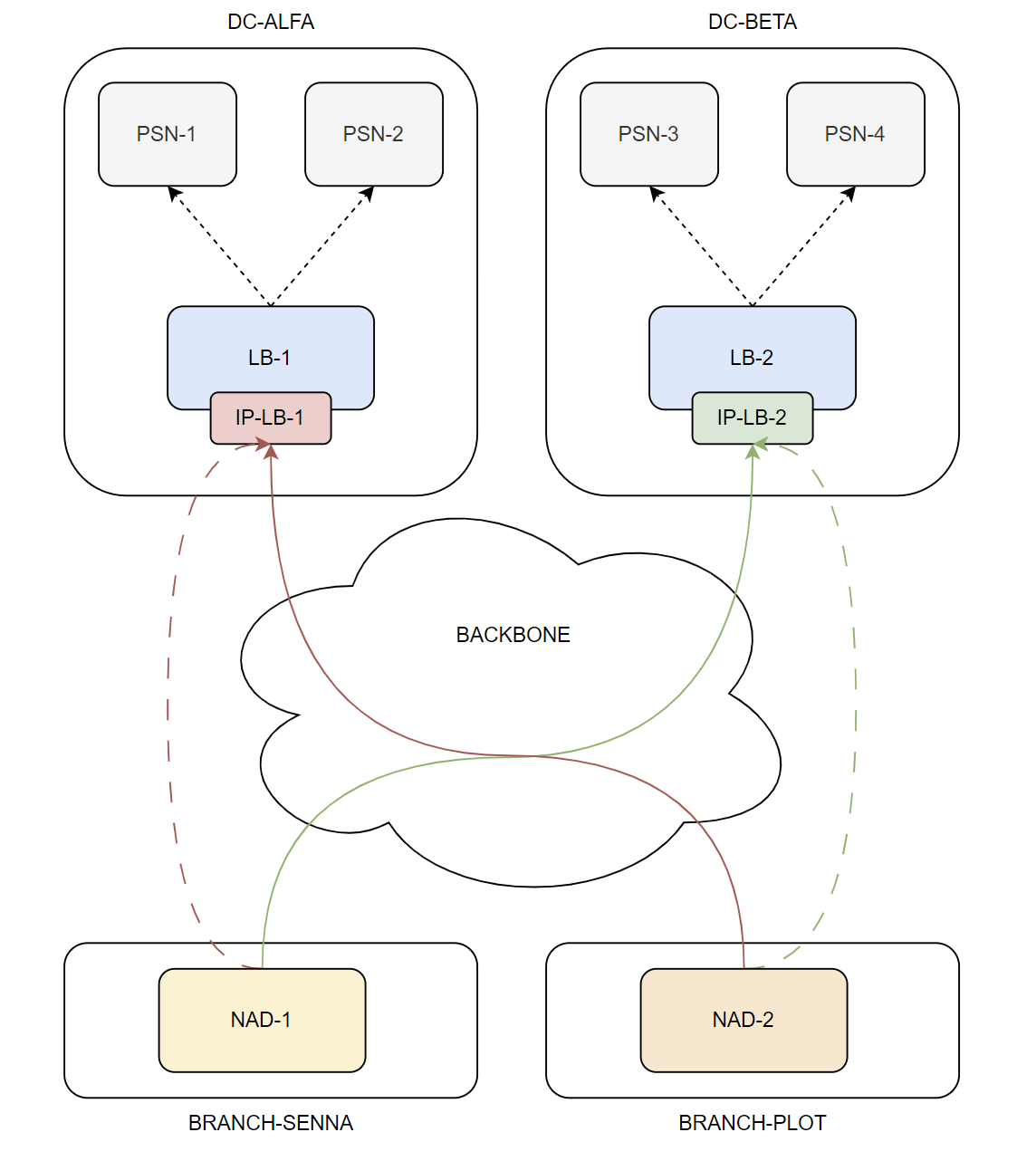
From the NAD perspective, all RADIUS traffic is exchanged with the two VIP addresses, IP-LB-1 and IP-LB-2. The final assumption concerns how traffic is distributed toward the two load balancers. At a high level, it can be assumed that half of the NADs have the order IP-LB-1 followed by IP-LB-2 in the RADIUS server group, while the other half has the opposite order. This allows authentication requests to be distributed across all PSNs. The considerations for the objects described earlier remain essentially the same; only the IP address changes, because it is the load balancer address rather than the ISE PSN node address.
In a correctly designed architecture, a single NAD should see:
- One RADIUS server (IP-LB-1) marked as DEAD only if both PSNs behind the load balancer can no longer provide the RADIUS service, or if the NAD can no longer reach IP-LB-1
- Two RADIUS servers (IP-LB-1 and IP-LB-2) marked as DEAD only if the same condition applies to both load balancers
What does this mean in practice? Suppose PSN-1 has a hardware fault and is therefore no longer available to provide authentication services. Should that fault be visible to the NAD? In most cases, the answer is no. Traffic originally directed to IP-LB-1 and load-balanced to PSN-1 should be transparently redirected to PSN-2, without the NAD becoming aware of the change. Therefore, the dead-server detection mechanism based on the conditions discussed in this post should not classify IP-LB-1 as DEAD.
To satisfy this condition, the overall detection time configured on the load balancer (LB-TIMER) must be strictly shorter than the overall detection time configured on the NAD (NAD-TIMER). Careful sizing of these parameters is therefore critical.
If this is not the case and LB-TIMER >= NAD-TIMER, the NAD would mark IP-LB-1 as DEAD and direct traffic to IP-LB-2, causing the original load-balancing design to no longer function as intended. Even with automatic testing configured through the idle-time keyword, the NAD would eventually restore IP-LB-1 to service: the load balancer health checks would identify PSN-1 as out of service and redirect the automatic-testing request to PSN-2, which would remain fully operational and respond successfully.
Takeaways
Correctly configuring dead-criteria, deadtime, and the other parameters discussed in this post is fundamental to designing a reliable switch-level failover mechanism. By selecting appropriate timer and counter values, the network engineer controls how quickly an authentication failure propagates through a RADIUS server group. Aggressive time and tries values shorten the outage window for each session, but they also increase the risk of marking a temporarily slow server as dead. A well-tuned probe, on the other hand, reduces uncertainty during recovery and allows the deadtime value to act as a safety net rather than the sole mechanism for returning a server to service. When load balancers are involved, careful coordination of these parameters becomes even more important for an optimal design.
I hope this post has been helpful. Feel free to reach out via social media if you have any additional information to share or if you need any clarification.
See you in the next one! 🙂