

The Myth of eBGP Multihop Sessions Between Loopback Interfaces
Introduction
While browsing a networking forum, I came across a discussion about whether the ebgp-multihop command is truly required when establishing an eBGP session between the Loopback interfaces of two directly connected routers. Having already worked through this scenario before, I decided to document it properly.
External BGP sessions, commonly referred to as eBGP sessions, use a default TTL of 1. Nevertheless, this behavior is not explicitly specified in the RFCs, beginning with RFC 1105, which was the first document to describe BGP and detail its core functionality and characteristics. Therefore, when establishing an eBGP session with a peer that is one or more Layer 3 hops away (meaning that the peering IP addresses do not belong to the same network), the neighbor <remote-peer-IP> ebgp-multihop command must be used. This command modifies the default behavior by increasing the TTL of outgoing BGP packets sent to the remote peer. When no explicit value is specified, the TTL defaults to 255, although a specific value can be configured by appending it to the command (e.g., neighbor <remote-peer-IP> ebgp-multihop <TTL-value>).
For those interested in a comprehensive list of RFCs covering BGP and its associated features and updates, the RFC Editor portal can be consulted.
Scenario Overview
Before diving into the main topic, a brief overview of the topology is presented.
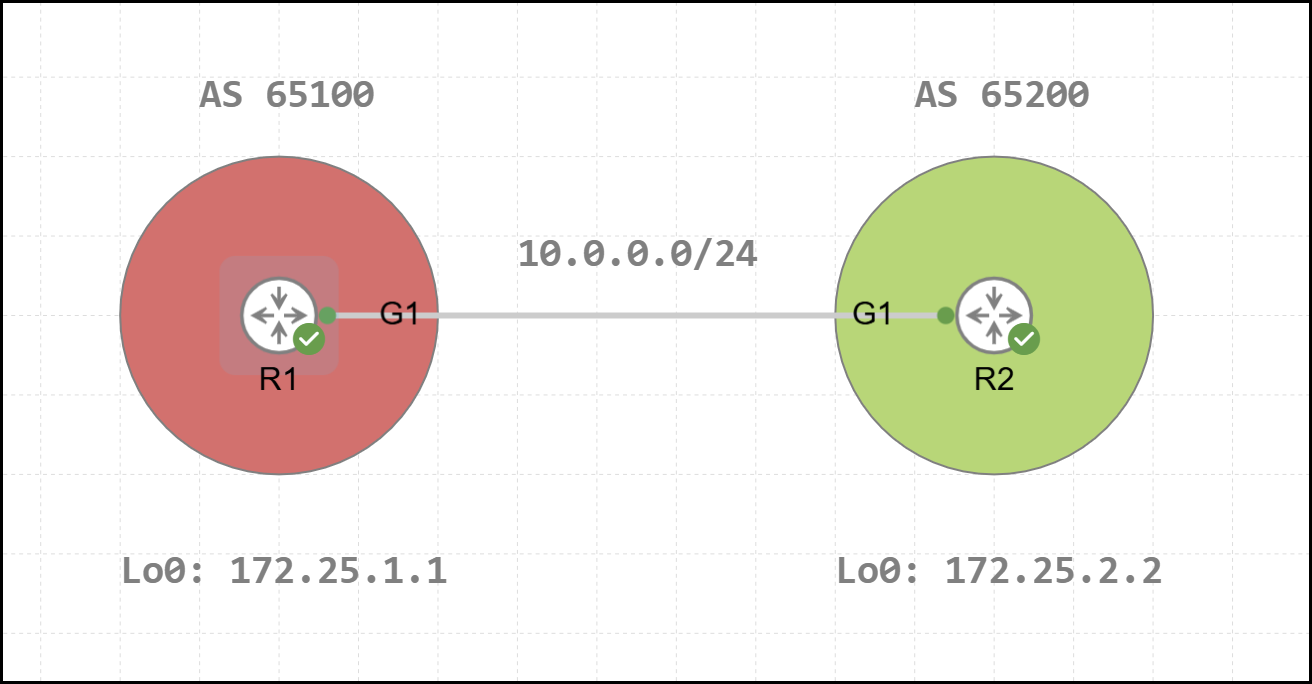
In this topology, R1 and R2 are two directly connected routers belonging to separate Autonomous Systems, AS 65100 and AS 65200, respectively. The initial BGP configuration for R1 and R2 is shown below.
1R1#show running-configuration | s r b
2router bgp 65100
3 bgp log-neighbor-changes
4 neighbor 172.25.2.2 remote-as 65200
5 neighbor 172.25.2.2 ebgp-multihop 255
6 neighbor 172.25.2.2 update-source Loopback0
7 !
8 address-family ipv4
9  neighbor 172.25.2.2 activate
10 exit-address-family1R2#show running-configuration | s r b
2router bgp 65200
3 bgp log-neighbor-changes
4 neighbor 172.25.1.1 remote-as 65100
5 neighbor 172.25.1.1 ebgp-multihop 255
6 neighbor 172.25.1.1 update-source Loopback0
7 !
8 address-family ipv4
9 neighbor 172.25.1.1 activate
10 exit-address-familyThe configuration follows a standard setup, with the session established between the Loopback 0 interfaces of R1 and R2, using IPv4 Unicast as the AFI/SAFI. Since this is an eBGP session, the neighbor <remote-peer-IP> ebgp-multihop command has been applied to increase the TTL. To verify the status of a BGP neighborship, either show bgp neighbors <remote-peer-IP> or the more recent show ip bgp neighbors <remote-peer-IP> command can be used. In the example below, the latter command is executed on R1 to display the state of the BGP session with R2 (the full output is included for completeness).
1R1#show ip bgp neighbors 172.25.2.2
2BGP neighbor is 172.25.2.2,  remote AS 65200, external link
3  BGP version 4, remote router ID 172.25.2.2
4  BGP state = Established, up for 00:02:13
5  Last read 00:00:32, last write 00:00:26, hold time is 180, keepalive interval is 60 seconds
6  Neighbor sessions:
7    1 active, is not multisession capable (disabled)
8  Neighbor capabilities:
9    Route refresh: advertised and received(new)
10    Four-octets ASN Capability: advertised and received
11    Address family IPv4 Unicast: advertised and received
12    Enhanced Refresh Capability: advertised and received
13    Multisession Capability:
14    Stateful switchover support enabled: NO for session 1
15  Message statistics:
16    InQ depth is 0
17    OutQ depth is 0
18
19                         Sent       Rcvd
20    Opens:                  1          1
21    Notifications:          0          0
22    Updates:                1          1
23    Keepalives:             3          3
24    Route Refresh:          0          0
25    Total:                  5          5
26  Do log neighbor state changes (via global configuration)
27  Default minimum time between advertisement runs is 30 seconds
28
29 For address family: IPv4 Unicast
30  Session: 172.25.2.2
31  BGP table version 1, neighbor version 1/0
32  Output queue size : 0
33  Index 1, Advertise bit 0
34  1 update-group member
35  Slow-peer detection is disabled
36  Slow-peer split-update-group dynamic is disabled
37                                 Sent       Rcvd
38  Prefix activity:               ----       ----
39    Prefixes Current:               0          0
40    Prefixes Total:                 0          0
41    Implicit Withdraw:              0          0
42    Explicit Withdraw:              0          0
43    Used as bestpath:             n/a          0
44    Used as multipath:            n/a          0
45    Used as secondary:            n/a          0
46
47                                   Outbound    Inbound
48  Local Policy Denied Prefixes:    --------    -------
49    Total:                                0          0
50  Number of NLRIs in the update sent: max 0, min 0
51  Last detected as dynamic slow peer: never
52  Dynamic slow peer recovered: never
53  Refresh Epoch: 1
54  Last Sent Refresh Start-of-rib: never
55  Last Sent Refresh End-of-rib: never
56  Last Received Refresh Start-of-rib: never
57  Last Received Refresh End-of-rib: never
58                                       Sent       Rcvd
59        Refresh activity:              ----       ----
60          Refresh Start-of-RIB          0          0
61          Refresh End-of-RIB            0          0
62
63  Address tracking is enabled, the RIB does have a route to 172.25.2.2
64  Route to peer address reachability Up: 1; Down: 0
65    Last notification 00:02:22
66  Connections established 1; dropped 0
67  Last reset never
68  External BGP neighbor may be up to 255 hops away.
69  External BGP neighbor NOT configured for connected checks (multi-hop no-disable-connected-check)
70  Interface associated: (none) (peering address NOT in same link)
71  Transport(tcp) path-mtu-discovery is enabled
72  Graceful-Restart is disabled
73  SSO is disabled
74Connection state is ESTAB, I/O status: 1, unread input bytes: 0
75Connection is ECN Disabled, Mininum incoming TTL 0, Outgoing TTL 255
76Local host: 172.25.1.1, Local port: 41268
77Foreign host: 172.25.2.2, Foreign port: 179
78Connection tableid (VRF): 0
79Maximum output segment queue size: 50
80
81Enqueued packets for retransmit: 0, input: 0  mis-ordered: 0 (0 bytes)
82
83Event Timers (current time is 0x6F302):
84Timer          Starts    Wakeups            Next
85Retrans             8          2             0x0
86TimeWait            0          0             0x0
87AckHold             4          1             0x0
88SendWnd             0          0             0x0
89KeepAlive           0          0             0x0
90GiveUp              0          0             0x0
91PmtuAger            1          0         0xE1187
92DeadWait            0          0             0x0
93Linger              0          0             0x0
94ProcessQ            0          0             0x0
95
96iss:   84468372  snduna:   84468510  sndnxt:   84468510
97irs: 3107632679  rcvnxt: 3107632817
98
99sndwnd:  16247  scale:      0  maxrcvwnd:  16384
100rcvwnd:  16247  scale:      0  delrcvwnd:    137
101
102SRTT: 487 ms, RTTO: 3168 ms, RTV: 2681 ms, KRTT: 0 ms
103minRTT: 45 ms, maxRTT: 1000 ms, ACK hold: 200 ms
104uptime: 139550 ms, Sent idletime: 26911 ms, Receive idletime: 26703 ms
105Status Flags: active open
106Option Flags: nagle, path mtu capable
107IP Precedence value : 6
108
109Datagrams (max data segment is 1460 bytes):
110Rcvd: 11 (out of order: 0), with data: 5, total data bytes: 137
111Sent: 10 (retransmit: 2, fastretransmit: 0, partialack: 0, Second Congestion: 0), with data: 5, total data bytes: 137
112
113 Packets received in fast path: 0, fast processed: 0, slow path: 0
114 fast lock acquisition failures: 0, slow path: 0
115TCP Semaphore      0x7F840CD6B148  FREE
As can be seen from the output, the session has been established successfully.
1BGP state = Established, up for 00:02:13The TTL applied to outgoing packets for this session is confirmed to be 255.
1Connection is ECN Disabled, Minimum incoming TTL 0, Outgoing TTL 255R2’s Loopback IP address used for the session does not belong to any subnet directly configured on R1.
1Interface associated: (none) (peering address NOT in same link)Among all the entries shown, one in particular is key to understanding the session behavior discussed in the next sections.
1External BGP neighbor NOT configured for connected checks (multi-hop no-disable-connected-check)Reviewing the eBGP Multihop Claim
With the simple topology and its configurations reviewed, it is now possible to revisit the initial claim: for eBGP sessions established between two peer IP addresses separated by one or more Layer 3 hops, the neighbor <remote-peer-IP> ebgp-multihop command must be used. In the case of directly connected routers, where an eBGP session is configured between Loopback interfaces, the applicability of this rule requires further examination. Is the neighbor <remote-peer-IP> ebgp-multihop command truly necessary in this scenario? A common assumption in this context is that BGP packets sent from R1 toward R2’s Loopback interface will have their TTL decremented, making the command seemingly necessary to ensure proper delivery. However, this assumption is incorrect. To understand this, it is worth examining how R2 handles the TTL field of a BGP packet received from R1. Since the packet’s destination IP (172.25.2.2) is assigned to a local logical interface, the TTL is never decremented. TTL is only decremented when a packet is forwarded to a next-hop device, not when it is delivered locally. Therefore, a TTL of 1 is sufficient to establish an eBGP session between the Loopback interfaces of two directly connected routers.
Consequently, removing the neighbor <remote-peer-IP> ebgp-multihop command from the configuration should not prevent the session from being established. To validate this, the command is removed on both R1 and R2 to observe the resulting session behavior.
1R1(config-router)#no neighbor 172.25.2.2 ebgp-multihop 1R2(config-router)#no neighbor 172.25.1.1 ebgp-multihop Debugging can then be enabled on R1 using the debug ip bgp 172.25.2.2 command to observe the session behavior in greater detail. Since the session must be hard reset for the configuration change to take effect, the clear ip bgp * command is used. Among the resulting output, two specific error entries provide clear insight into the observed behavior.
1*Mar 30 18:53:13.877: BGP: nbr global 172.25.2.2 Open active delayed 11264ms (35000ms max, 60% jitter)
2*Mar 30 18:53:13.877: BGP: nbr global 172.25.2.2 Active open failed - open timer running
3*Mar 30 18:53:24.126: BGP: 172.25.2.2 Active open failed - no route to peer, open active delayed 9216ms (35000ms max, 60% jitter)
If a packet capture is performed on the link connecting the two GigabitEthernet 1 interfaces of the routers, it becomes evident that neither R1 nor R2 sent any packets to their respective peer to establish a new eBGP session. The only packets present, shown below, are those generated by the session reset triggered using the clear command.
Removing this command from the configuration did not allow the eBGP session to be established. The third log presented earlier could be misleading and might suggest that, on R1, the route required to reach R2’s Loopback interface address is missing. This is not the case, as the static route configured during the initial setup is still present and has not been removed. What, then, is preventing the session from forming successfully? To investigate, the output of the show ip bgp neighbors 172.25.2.2 command was retrieved again from R1. This output can be compared with the initial one, obtained when the neighbor <remote-peer-IP> ebgp-multihop command was still present on both routers. From the complete output, only a single entry is relevant.
1External BGP neighbor NOT configured for connected checks (multi-hop no-disable-connected-check)1External BGP neighbor configured for connected checks (single-hop no-disable-connected-check)Between these two outputs, two key differences can be observed:
- In the first case, the session is defined as multi-hop due to the applied command, whereas in the second case, it is classified as single-hop
- In the first case, the session is not configured for the connected check, while in the second case, it is
Of the two points, the second is the most significant. During the steps performed by R1 and R2 to establish an external BGP session, a critical verification occurs: the device checks whether the configured remote peer IP belongs to a directly connected subnet. If this check fails, the eBGP session cannot be established. In the case of sessions between the Loopback interfaces of adjacent routers, these addresses cannot belong to the same subnet (unless misconfigured). As a result, this verification prevents the session from being successfully formed.
Disabling the Connected Check Option
Since TTL management in this scenario does not pose an issue for establishing the BGP session between the two peers, it is necessary to disable the connected check. This is achieved while keeping the TTL at 1 by applying the command neighbor <remote-peer-IP> disable-connected-check within BGP configuration mode, as shown below.
1R1(config)#router bgp 65100
2R1(config-router)#neighbor 172.25.2.2 disable-connected-check 1R2(config)#router bgp 65200
2R2(config-router)#neighbor 172.25.1.1 disable-connected-check Once applied on both routers, the BGP session is successfully re-established.
1R1#show bgp neighbors 172.25.2.2 | include BGP state
2  BGP state = Established, up for 00:26:45
The updated configuration for R1 is presented below.
1R1#show running-configuration | s r b
2router bgp 65100
3 bgp log-neighbor-changes
4 neighbor 172.25.2.2 remote-as 65200
5 neighbor 172.25.2.2 disable-connected-check
6 neighbor 172.25.2.2 update-source Loopback0
7 !
8 address-family ipv4
9  neighbor 172.25.2.2 activate
10 exit-address-family
The same applies to R2.
1R2#show running-configuration | s r b
2router bgp 65200
3 bgp log-neighbor-changes
4 neighbor 172.25.1.1 remote-as 65100
5 neighbor 172.25.1.1 disable-connected-check
6 neighbor 172.25.1.1 update-source Loopback0
7 !
8 address-family ipv4
9  neighbor 172.25.1.1 activate
10 exit-address-family
At this point, the output of the show ip bgp neighbors 172.25.2.2 command can be reviewed on R1 to examine the session with R2, filtering to show only the relevant information.
1R1#show ip bgp neighbors 172.25.2.2 | include connected checks|same link|Outgoing TTL
2  External BGP neighbor NOT configured for connected checks (single-hop disable-connected-check)
3  Interface associated: (none) (peering address NOT in same link)
4Connection is ECN Disabled, Mininum incoming TTL 0, Outgoing TTL 1
The session is still classified as single-hop, since the neighbor <remote-peer-IP> ebgp-multihop command has not been applied, while the connected check has been disabled. Moreover, the TTL value remains at its default of 1.
Takeaways
In conclusion, for directly connected routers, a BGP session between Loopback interfaces can be established with the default TTL of 1. The neighbor <remote-peer-IP> ebgp-multihop command is not required in this scenario: what actually prevents the session from forming is the connected check, which must be explicitly disabled using neighbor <remote-peer-IP> disable-connected-check.
I hope this post has been helpful. If you have any additional thoughts to share, feel free to reach out via social media. See you in the next one! 🙂