

Managing Configuration Comments on IOS XR
Introduction
During the migration of an ASR9K configuration from another device, the occasion arose to explore one of the features that distinguish IOS XR from IOS XE: native support for comments directly within the configuration. In IOS XE, comments cannot be saved within the running configuration. When using the ! character, comments are not stored in NVRAM or in the active configuration file, and do not appear when executing the show running-config command. IOS XR, however, behaves differently. On this platform, comments can be included directly in the configuration and are stored alongside the rest of it, making them visible in the output of commands such as show running-config.
How to Insert a Comment in IOS XR
To insert a comment in the configuration, the ! character must be entered before committing the changes. The comment is associated with the configuration command that follows. An example, based on the following topology, is shown below.
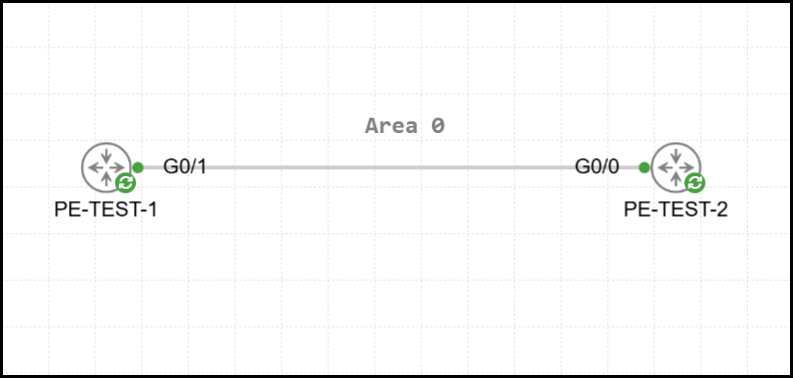
A simple OSPF adjacency in Area 0 has been configured between the two routers. R1 advertises the network 1.1.1.1/32 (which corresponds to the IP address assigned to the local Loopback 0 interface) to R2. Below is the configuration of R1 and R2.
1RP/0/RP0/CPU0:R1#show running-config router ospf 1
2Sat Apr  4 07:59:51.749 UTC
3router ospf 1
4 area 0
5  interface Loopback0
6   passive enable
7  !
8  interface GigabitEthernet0/0/0/1
9   bfd minimum-interval 50
10   bfd fast-detect
11   bfd multiplier 3
12   network point-to-point
13  !
14 !
15!1RP/0/RP0/CPU0:R2#show running-config router ospf 1
2Sat Apr 4 08:00:51.774 UTC
3router ospf 1
4 area 0
5 interface Loopback0
6 passive enable
7 !
8 interface GigabitEthernet0/0/0/1
9 bfd minimum-interval 50
10 bfd fast-detect
11 bfd multiplier 3
12 network point-to-point
13 !
14 !
15!R2 correctly receives the advertisement for the network 1.1.1.1/32, which is advertised by R1 with an OSPF cost of 1.
1RP/0/RP0/CPU0:R2#show ip ospf 1 database router adv-router 1.1.1.1
2Sat Apr  4 08:01:20.221 UTC
3
4
5            OSPF Router with ID (2.2.2.2) (Process ID 1)
6
7                Router Link States (Area 0)
8
9  Routing Bit Set on this LSA
10  LS age: 120
11  Options: (No TOS-capability, DC)
12  LS Type: Router Links
13  Link State ID: 1.1.1.1
14  Advertising Router: 1.1.1.1
15  LS Seq Number: 80000029
16  Checksum: 0x724e
17  Length: 60
18   Number of Links: 3
19
20    Link connected to: a Stub Network
21     (Link ID) Network/subnet number: 1.1.1.1
22     (Link Data) Network Mask: 255.255.255.255
23      Number of TOS metrics: 0
24       TOS 0 Metrics: 1
25
26   [OUTPUT OMITTED]
The OSPF cost of the Loopback 0 interface on R1 is then modified, and a comment is added.
1RP/0/RP0/CPU0:R1(config)#router ospf 1
2RP/0/RP0/CPU0:R1(config-ospf)#area 0
3RP/0/RP0/CPU0:R1(config-ospf-ar)#interface loopback 0
4RP/0/RP0/CPU0:R1(config-ospf-ar-if)#! BACKUP PATH - COST 450
5RP/0/RP0/CPU0:R1(config-ospf-ar-if)#cost 450
6RP/0/RP0/CPU0:R1(config-ospf-ar-if)#commit
7Sat Apr 4 08:02:14.399 UTCWhen the OSPF configuration is displayed, the comment is now visible. It is worth emphasizing that it is associated with the configuration command that follows, meaning that the passive enable command is entirely independent of the comment shown above.
1RP/0/RP0/CPU0:R1#show running-config router ospf 1
2Sat Apr  4 08:02:46.058 UTC
3router ospf 1
4 area 0
5  interface Loopback0
6   ! BACKUP PATH - COST 450
7   cost 450
8   passive enable
9  !
10  interface GigabitEthernet0/0/0/1
11   bfd minimum-interval 50
12   bfd fast-detect
13   bfd multiplier 3
14   network point-to-point
15  !
16 !
17!
The updated OSPF cost for the 1.1.1.1/32 network was subsequently received by R2.
1RP/0/RP0/CPU0:R2#show ip ospf 1 database router adv-router 1.1.1.1
2Sat Apr  4 08:03:13.727 UTC
3
4
5            OSPF Router with ID (2.2.2.2) (Process ID 1)
6
7                Router Link States (Area 0)
8
9  Routing Bit Set on this LSA
10  LS age: 60
11  Options: (No TOS-capability, DC)
12  LS Type: Router Links
13  Link State ID: 1.1.1.1
14  Advertising Router: 1.1.1.1
15  LS Seq Number: 8000002a
16  Checksum: 0x21db
17  Length: 60
18   Number of Links: 3
19
20    Link connected to: a Stub Network
21     (Link ID) Network/subnet number: 1.1.1.1
22     (Link Data) Network Mask: 255.255.255.255
23      Number of TOS metrics: 0
24       TOS 0 Metrics: 450
25
26 [OUTPUT OMITTED]How to Modify a Comment in IOS XR
Once a comment has been associated with a command, it can be updated. Two approaches are available:
- Enter the updated comment and then reapply the same command with identical configuration parameters
- Enter the updated comment and then apply the same command with different configuration parameters
In the first scenario, the comment associated with the OSPF cost command on the Loopback 0 interface of R1 is updated while the cost value remains unchanged.
1RP/0/RP0/CPU0:R1(config)#router ospf 1
2RP/0/RP0/CPU0:R1(config-ospf)#area 0
3RP/0/RP0/CPU0:R1(config-ospf-ar)#interface loopback 0
4RP/0/RP0/CPU0:R1(config-ospf-ar-if)#! NEW COMMENT - BACKUP PATH - 450
5RP/0/RP0/CPU0:R1(config-ospf-ar-if)#cost 450
6RP/0/RP0/CPU0:R1(config-ospf-ar-if)#commit
7Sat Apr  4 08:04:48.084 UTC
The configuration confirms that the comment has been successfully updated. Additionally, packet capture analysis verified that R1 did not send any OSPF LSU messages to R2.
1RP/0/RP0/CPU0:R1#show running-config | i COMMENT
2Sat Apr  4 08:05:15.676 UTC
3   ! NEW COMMENT - BACKUP PATH - 450
In the second scenario, the comment is updated and the OSPF cost is changed from 450 to 150.
1RP/0/RP0/CPU0:R1(config)#router ospf 1
2RP/0/RP0/CPU0:R1(config-ospf)#area 0
3RP/0/RP0/CPU0:R1(config-ospf-ar)#interface loopback 0
4RP/0/RP0/CPU0:R1(config-ospf-ar-if)#! NEW VALUE - BACKUP PATH - 150
5RP/0/RP0/CPU0:R1(config-ospf-ar-if)#cost 150
6RP/0/RP0/CPU0:R1(config-ospf-ar-if)#commit
7Sat Apr  4 08:05:55.600 UTC
The configuration output confirms that the comment has been successfully updated.
1RP/0/RP0/CPU0:R1#show running-config | i NEW
2Sat Apr  4 08:06:34.672 UTC
3 ! NEW VALUE - BACKUP PATH - 150What Happens If the Associated Command Is Not Re-entered?
If an attempt is made to update a comment without re-entering the associated command, two scenarios may occur.
In the first, the CLI terminal is already in the target configuration mode and a previous commit has already been performed (for example, setting the interface priority). In this case, updating the comment and issuing a new commit results in the following system message.
1RP/0/RP0/CPU0:R1(config-ospf-ar-if)#
2RP/0/RP0/CPU0:R1(config-ospf-ar-if)#priority 111
3RP/0/RP0/CPU0:R1(config-ospf-ar-if)#commit
4Sat Apr  4 08:07:31.528 UTC
5RP/0/RP0/CPU0:R1(config-ospf-ar-if)#! NEW VALUE - NO COMMAND
6RP/0/RP0/CPU0:R1(config-ospf-ar-if)#commit
7Sat Apr  4 08:07:44.904 UTC
8No configuration changes to commit.
9RP/0/RP0/CPU0:R1(config-ospf-ar-if)#
In the second scenario, the starting point is EXEC mode, or more generally, a different configuration mode. In this case, accessing the target configuration mode and attempting to update the comment results in different behavior.
1RP/0/RP0/CPU0:R1#
2RP/0/RP0/CPU0:R1#conf t
3Sat Apr  4 08:08:25.502 UTC
4RP/0/RP0/CPU0:R1(config)#router ospf 1
5RP/0/RP0/CPU0:R1(config-ospf)#area 0
6RP/0/RP0/CPU0:R1(config-ospf-ar)#interface loopback 0
7RP/0/RP0/CPU0:R1(config-ospf-ar-if)#! NEW VALUE - NO COMMAND - EXEC
8RP/0/RP0/CPU0:R1(config-ospf-ar-if)#commit
9Sat Apr  4 08:08:45.108 UTC
10RP/0/RP0/CPU0:R1(config-ospf-ar-if)#
The commit was successful. One might therefore assume that the earlier statement, that the associated command must be re-entered to update the comment, is incorrect. To verify this, the commit is analyzed in detail by retrieving its ID.
1RP/0/RP0/CPU0:R1#show configuration commit list 1
2Sat Apr  4 08:09:21.220 UTC
3SNo. Label/ID              User      Line                Client      Time Stamp
4~~~~ ~~~~~~~~              ~~~~      ~~~~                ~~~~~~      ~~~~~~~~~~
51 1000000040 admin con0_RP0_CPU0 CLI Sat Apr 4 08:08:45 2026Once the commit ID has been retrieved, the show configuration commit changes <commit-id> diff command can be used to verify whether the comment was actually updated.
1RP/0/RP0/CPU0:R1#show configuration commit changes 1000000040 diff
2Sat Apr  4 08:09:50.938 UTC
3!! Building configuration...
4!! IOS XR Configuration 24.3.1
5#  router ospf 1
6#   area 0
7#    interface Loopback0
8#    !
9#   !
10#  !
11end
It is also possible to verify directly from the running-config whether the change was actually applied.
1RP/0/RP0/CPU0:R1#show running-config router ospf 1 area 0 interface loopback 0
2Sat Apr  4 08:11:00.960 UTC
3router ospf 1
4 area 0
5  interface Loopback0
6   ! NEW VALUE - BACKUP PATH - 150
7   cost 150
8   passive enable
9   priority 111
10  !
11 !
12!
It is clear that, although the commit was successful, the comment was not actually updated.
How to Remove a Comment in IOS XR
To remove a comment, the clear comment command must be entered, after which the associated configuration command must be re-entered (in this case, the cost command). The example below shows how to remove the ! NEW VALUE - BACKUP PATH - 150 comment.
1RP/0/RP0/CPU0:R1(config-ospf-ar-if)#clear comment
2RP/0/RP0/CPU0:R1(config-ospf-ar-if)#cost 150
3RP/0/RP0/CPU0:R1(config-ospf-ar-if)#commit
4Sat Apr  4 08:15:05.640 UTC
As shown below, the comment was successfully removed. Packet capture analysis, along with the OSPF LS age observed from R2's perspective, confirmed that R1 did not send any OSPF LSU messages to R2.
1RP/0/RP0/CPU0:R1#show running-config router ospf 1 area 0 interface loopback 0
2Sat Apr  4 08:15:54.017 UTC
3router ospf 1
4 area 0
5  interface Loopback0
6   cost 150
7   passive enable
8   priority 111
9  !
10 !
11!How to Insert a Comment within a Commit in IOS XR
So far, it has been shown how comments can be added, modified, and removed from the configuration. In IOS XR, comments can also be attached to a commit (up to 60 characters). Similar to version control systems (VCS), this functionality helps track which changes are included in a given commit. The example below shows how to reconfigure the interface cost while including a descriptive comment.
1RP/0/RP0/CPU0:R1(config-ospf-ar-if)#cost 450
2RP/0/RP0/CPU0:R1(config-ospf-ar-if)#commit comment ?
3  LINE  Comment for this commit (Max 60 characters)
4RP/0/RP0/CPU0:R1(config-ospf-ar-if)#commit comment Backup Link with cost 450
5Sat Apr  4 08:17:14.951 UTC
The list of all commits (up to a maximum of 36) can be displayed using the show configuration commit list command.
1RP/0/RP0/CPU0:R1#show configuration commit list
2Sat Apr  4 08:17:37.821 UTC
3SNo. Label/ID              User      Line                Client      Time Stamp
4~~~~ ~~~~~~~~              ~~~~      ~~~~                ~~~~~~      ~~~~~~~~~~
51    1000000043            admin     con0_RP0_CPU0       CLI         Sat Apr  4 08:17:15 2026
62    1000000042            admin     con0_RP0_CPU0       CLI         Sat Apr  4 08:16:44 2026
73    1000000041            admin     con0_RP0_CPU0       CLI         Sat Apr  4 08:15:05 2026
84    1000000040            admin     con0_RP0_CPU0       CLI         Sat Apr  4 08:08:45 2026
95    1000000039            admin     con0_RP0_CPU0       CLI         Sat Apr  4 08:07:31 2026
10[OUTPUT OMITTED]
To view the associated comment, show configuration commit list detail displays the details of each commit.
1RP/0/RP0/CPU0:R1#show configuration commit list detail
2Sat Apr  4 08:18:02.444 UTC
3
4   1) CommitId: 1000000043                  Label: NONE
5      UserId:   admin                       Line:  con0_RP0_CPU0
6      Client:   CLI                         Time:  Sat Apr  4 08:17:15 2026
7      Comment:   Backup Link with cost 450
8
9[OUTPUT OMITTED]
In the most recent commit, the Comment field displays the value entered previously.
Tracking Comment Changes with the diff Command
In the previous sections, the show configuration commit changes <commit-ID> diff command was used to verify whether the "dummy" commit had any effect. This section examines more generally how this command can be used to track changes made to configuration comments.
The starting point is a configuration without any comments.
1RP/0/RP0/CPU0:R1#show running-config router ospf 1 area 0 interface loopback 0
2Sat Apr  4 08:39:38.546 UTC
3router ospf 1
4 area 0
5  interface Loopback0
6   passive enable
7  !
8 !
9!
A comment is added along with its associated command. As can be verified by checking the differences for the newly created commit, both entries are linked to the + marker.
1RP/0/RP0/CPU0:R1(config-ospf-ar-if)#show configuration commit changes 1000000046 diff
2Sat Apr  4 08:45:17.437 UTC
3!! Building configuration...
4!! IOS XR Configuration 24.3.1
5#  router ospf 1
6#   area 0
7#    interface Loopback0
8+     ! NEW COMMENT
9+     cost 10
10#    !
11#   !
12#  !
13end
But what about when only the comment is modified, while the associated command remains unchanged? Is the change reflected in the diff?
When the comment is modified in isolation, the diff marks both entries with #, meaning the modification is not explicitly tracked.
1RP/0/RP0/CPU0:R1(config-ospf-ar-if)#show configuration commit changes 1000000047 diff
2Sat Apr  4 08:47:09.117 UTC
3!! Building configuration...
4!! IOS XR Configuration 24.3.1
5#  router ospf 1
6#   area 0
7#    interface Loopback0
8#     ! SECOND COMMENT
9#     cost 10
10#     passive enable
11#    !
12#   !
13#  !
14end
Finally, when the comment is removed using the clear command, this is not reflected in the diff. In fact, it still appears (even though it is no longer present in the running-config). Therefore, there is no association with the - entry that normally appears when a configuration command is deleted, for example by prefixing the command with no.
1RP/0/RP0/CPU0:R1(config-ospf-ar-if)#show configuration commit changes last 1 diff
2Sat Apr  4 08:52:42.586 UTC
3!! Building configuration...
4!! IOS XR Configuration 24.3.1
5#  router ospf 1
6#   area 0
7#    interface Loopback0
8#     ! SECOND COMMENT
9#     cost 10
10#    !
11#   !
12#  !
13end
The following output shows the final interface configuration after the comment has been removed.
1RP/0/RP0/CPU0:R1#show running-config router ospf 1 area 0 interface loopback 0
2Sat Apr  4 08:55:21.816 UTC
3router ospf 1
4 area 0
5  interface Loopback0
6   passive enable
7  !
8 !
9!
Takeaways
When configuring a specific parameter, it may be useful to include a comment to provide additional context for other network administrators accessing the device. Native commands do not always allow comments to be stored within the configuration. In such cases, the ! character comes in handy.
I hope this post has been helpful. Feel free to reach out via social media if you have any additional information to share or if you need any clarification. See you in the next one! 🙂